

Scalable Version Control for Game Development
Perforce P4 is the industry standard version control platform for game development. Trusted by 19/20 of the top AAA game development studios, and award-winning studios large and small, P4 gives your teams a version control foundation for creating without limits.
Game Development Software: Features That Matter Most
Transform Your Game Development with the Version Control Leader
Perforce P4 is a scalable foundation that unlocks efficiency everywhere, for everyone. Track everything—from source code to 3D assets—with the speed, scale, and control no other system can match.
- Enhance collaboration with external partners and vendors with granular access control down to the file level and IP address.
- Reduce duplicate work and conflicts amongst large game dev teams by implementing exclusive file locking with global lock visibility.
- Share the same code across different target game platforms with advanced branching models and built-in visualizations (via Streams).
- Reduce storage costs by archiving past projects on S3 (and S3-compatible) object storage support.
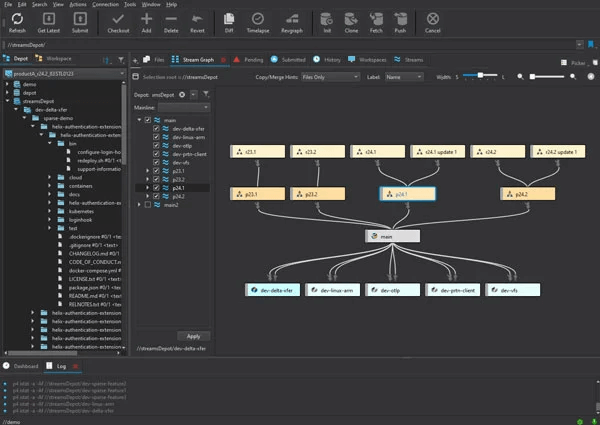
P4 Code Review is a web-based code review tool integrated withP4. Built to streamline code review and collaboration, P4 Code Review’s intuitive interface enables teams to ship games and updates faster, while supporting full traceability.
- Customize your team’s code review workflow, by implementing a pre-commit or post-commit review model.
- Enable collaborative reviews by adding comments and up or down voting submitted reviews, ensuring no errors make their way into a release branch.
- View a complete code review history
- Flexible API that enables custom configuration of P4 to seamlessly work with your preferred and proprietary tools.

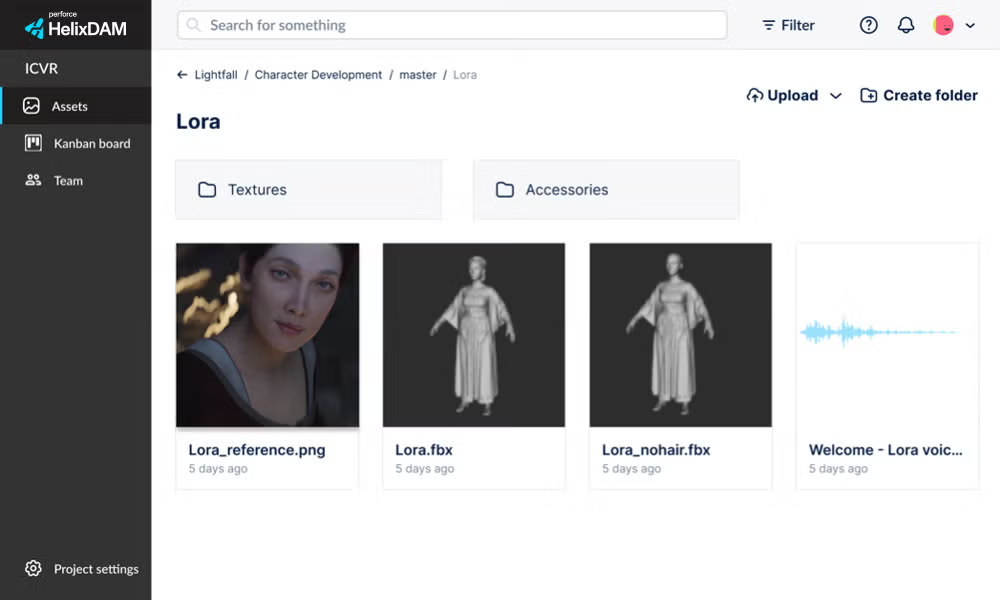
Provide your art and design teams with one central place to find, review, and get feedback on every version of the characters, accessories, and materials they create. P4 DAM connects with P4 to give your studio the visual library it needs to efficiently reference and reuse its catalog of IP.
- Interactive views that let you spin, rotate, and review 3D models and character animations.
- Easily locate assets with AI-powered search, tagging capabilities, and customizable metadata for labeling and categorization.
- Share projects and assets across your departments, teams, and subsidiaries.
- Easily link to depots from past and current projects and even mix classic and stream depots inside a single project.
- File locking that shows your art teams what characters, materials and textures are currently being worked on.
With the ability to track bugs, time spent, and overall progress across a mix of development methodologies, P4 Plan (formerly Hansoft) assembles the many mindsets and workflows on your team into a unified view that anyone can follow.
- Gain alignment across your team and a comprehensive view of your projects with the following views: Product Backlog, Quality Assurance, Planning, Reports, and Dashboards.
- Import Excel files to instantaneously create projects and tasks and update existing items.
- Built-in Pipeline Editor for templatizing your team’s custom workflows.
- Invite ghost users into projects for seamless collaboration with external partners and vendors.
- Advanced GraphQL API for developing custom automations and integrations with your team’s game dev toolkit.

P4 Cloud Now Available on AWS Marketplace
Designed for teams under 100, P4 Cloud is our managed and hosted offering of Perforce P4. Get the same scalable version control trusted by top gaming and animation studios, chip designers, and visualization teams, fully deployed for you on a dedicated server.
Ubisoft Incorporate P4 in Their Game Development
Ubisoft trusts P4 source control to support over 1,000+ team members across roles and departments. "The tight integration of our tools with [P4] using the [P4] API has led to great improvements in productivity,” says Beaufils.
Unmatched Scalability and Performance
"We wasted up to a third of our day on tasks that were completely unrelated to the work. Once we realized we could get that time back, choosing Perforce was a no-brainer."
- Jakub Kutrzuba, DevOps Lead at CD PROJEKT RED
82%
Rate P4’s ability to scale as “Best in Class.”
100% ROI in 2 years
Based on customer feedback in customer survey.
“Perforce [P4] does exactly what we need it to do. Its performance is superior to other products.”
- Jesus Martinez, Producer, Tequila Works

Continuous Testing Built for Gaming
BlazeMeter empowers game developers to deliver exceptional player experiences by simulating millions of users across platforms. Test at scale with performance testing, isolate features with Service Virtualization, and accelerate development to stay ahead of the competition.

Design Game Logic with Perforce Gliffy
Perforce Gliffy is an Atlassian diagramming tool that allows teams to easily design, share, and maintain diagrams. It's useful for mapping game logic, user experience flows, and server-client architecture for online gaming. Keep your users happy and design early.

Increase Java Dev Efficiency
Java is the language for mobile and online gaming platforms, offering cross-platform compatibility and server-side logic. Perforce JRebel helps Java development teams save time, go to market faster, and improve code quality of Java-based apps.
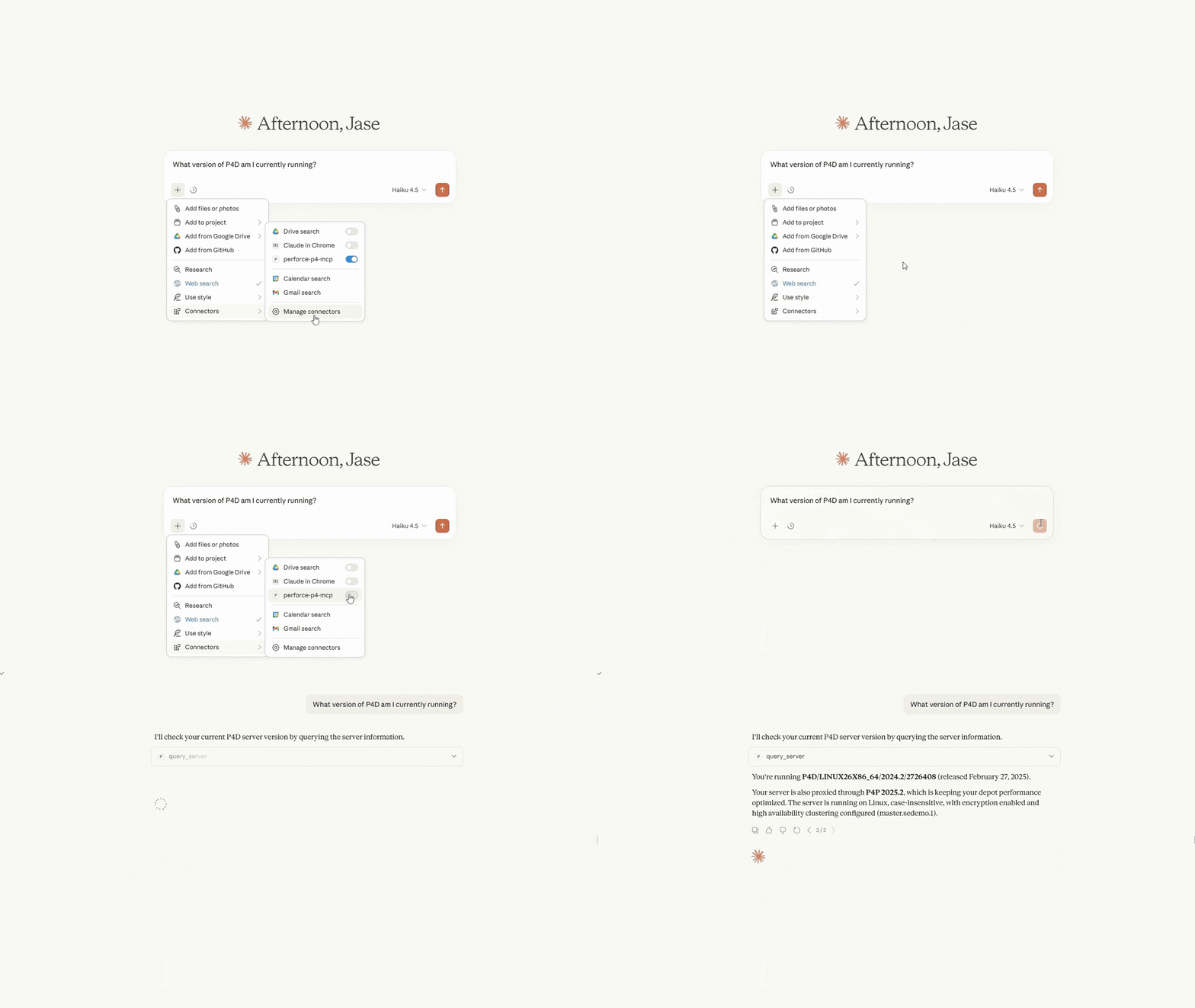
Your Intelligent System of Record with P4 MCP
Give your teams instant clarity into what’s happening across every project, including who changed what, when, and why, all inside the AI tools they already use (like ChatGPT and Claude).
Get Started with P4
Your game development team can get started with P4 for free for up to 5 users and 20 workspaces.
Get Started with Perforce P4 Cloud
Get Perforce-managed and hosted version control for only $39/user/month.