
Blog
December 17, 2025

Your Perforce IP Lifecycle Management (IPLM) software is a critical asset that benefits from regular management and maintenance. However, managing IPLM can be complex. The scale of deployments can range from a single server to twenty or thirty instances across the globe. An IPLM environment includes a variety of services, such as PI Server, PI Web, PI Cache, Neo4j, Redis, and MongoDB, each with its own set of configurations and log files. Additionally, proxies, load balancers, and solution components like rule scripts, Jira plugins, and job schedulers add further layers of complexity.
This guide outlines five IPLM best practices to better manage and maintain your system. By following these guidelines proactively, you’ll prevent costly downtime, protect valuable IP data, and ensure your IPLM software remains a reliable, high-performance asset.
Back to topChecklist for IPLM Health
Before going into the details, here is an overview of the five best practices covered in this blog that you can implement today:
- Backups: Have you established and tested a comprehensive backup and restore plan?
- Server Health: Do services restart automatically after a reboot? Are you managing log files to prevent disk space issues?
- Software Updates: Is your software, including IPLM and the operating system, kept up to date with the latest security patches and releases?
- Monitoring: Are you actively monitoring server health, service status, and resource utilization to preemptively address issues?
- Configuration Management: Are you managing configurations and customizations in a structured, version-controlled manner?
Let’s address each of these points in greater depth so that you can build a resilient IPLM environment that supports your team’s needs and protects your valuable IP data.
Back to top1. Implement a Robust Backup Strategy
A solid backup plan is your primary defense against data loss. However, simply running a backup command is not enough. A truly effective strategy involves planning, testing, and consistent verification.
Key Backup Considerations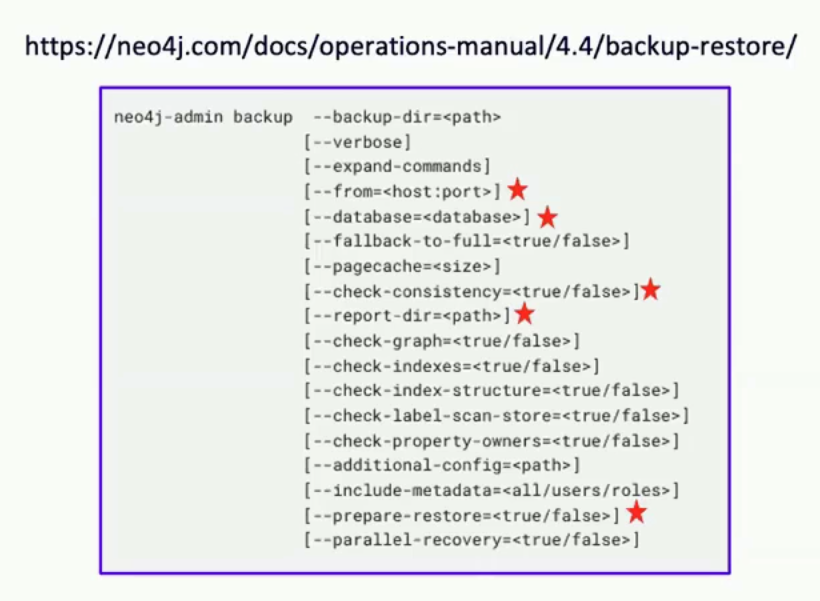
- Frequency and Retention: Determine an appropriate backup schedule, including daily backups, and an ongoing retention policy. A common approach is to keep daily backups for a week, weekly backups for three months, and monthly backups for several years. This balances data granularity with storage costs.
- Test Your Restore Procedure: A backup is only useful if it can be successfully restored. Regularly test your restore process to ensure your team knows exactly what to do when a problem arises. You’ll minimize downtime during an actual emergency.
- Verify Backup Integrity: Occasionally, customers encounter issues because their backups were failing silently. It is essential to check for backup failures and database inconsistencies, which are often reported in the backup logs. Automate alerts to notify administrators of any failures so they can be addressed immediately.
- Leverage Enterprise Features: Customers using the enterprise edition of Neo4j can perform live, online backups without taking servers offline. This significantly improves availability and simplifies the backup process.
- Backup More Than the Database: In addition to the database, you must also back up your configuration files and customizations. If a server is completely lost, you will need these files to restore full functionality. The best practice is to store these configurations in a version control system like Perforce P4.
Finally, develop a disaster recovery plan. This is especially critical for complex, multi-server, or multi-region deployments. Outline the steps required to recover from various failure scenarios, such as the loss of a single server or an entire cloud region.
Back to top
2. Maintain Healthy and Responsive Servers
A healthy server is the foundation of a stable, reliable IPLM platform. This involves ensuring that services restart automatically during reboots and managing log files effectively to prevent system failures.
Ensure Services Auto-Restart
Servers reboot for many reasons: planned maintenance, power outages, or unexpected IT actions. All IPLM-related services must be configured to restart automatically after a reboot. Our packages do not enable this by default, so it's critical to verify and enable auto-restart for all services, including PI Server, PI Web, Neo4j, Redis, and others.
Manage Log File Rotation
Unmanaged log files are one of the most common causes of server failure. As log files grow, they consume disk space, degrade performance, and can eventually crash the machine. Large logs also make it difficult for support teams to diagnose issues.
Implement a log rotation process for all services. Tools like logrotate on Linux can automatically rotate, compress, and manage log files based on size or a schedule. Also, review the log verbosity settings for each service. For instance, MongoDB can be quite noisy by default. Adjust log levels to capture necessary information without generating excessive data and remember to turn off debug-level logging after a troubleshooting session is complete.
Back to top
3. Keep Software Up to Date
Regularly updating your software is essential for security and stability. Perforce IPLM typically releases quarterly updates that contain new features, security updates, and bug fixes. Users should also update operating systems and security patches. Keeping everything current makes future upgrades easier and ensures you benefit from the latest improvements.
To manage updates safely, use a test environment. The ideal setup includes:
- A development environment for creating and testing customizations.
- A staging environment with an up-to-date copy of your production database for final testing.
- A production environment for your live operations.
At a minimum, a dedicated test server is crucial for verifying a new release before deploying it to production. Consider creating an integration test plan that outlines the key functionality to be tested with each new release before going live in production.
Back to top
4. Monitor and Alert
Continuous monitoring provides the visibility needed to maintain server health and diagnose problems before they negatively impact your users. Set up monitoring and alerting for all services to ensure they are responsive.
Track key system metrics like:
- CPU load
- Disk space
- Network traffic
- Read/write traffic to the Neo4j database
Monitoring these metrics helps you identify performance bottlenecks and appropriately scope your server resources. It's also important to monitor background cron jobs, such as LDAP user synchronization and backups. These jobs can fail silently, so ensure they have strong error-catching and alerting mechanisms.
By combining robust monitoring practices with proactive maintenance, you can safeguard the reliability and efficiency of your IPLM system, allowing it to continue driving value for your organization.
Back to top
5. Manage Configurations and Customizations
As your IPLM deployment grows, so does the complexity of managing configurations and customizations. The best solution is to use a standardized directory structure that simplifies support, scripting, and administration.
Recommended Directory Structure
- /usr/share/mdx/products: The standard installation location for IPLM packages.
- /var/log: The standard location for log files.
- /etc/mdx: This directory should only contain core configuration files like piweb.conf and piserver.yaml. Do not place any executable scripts here, as security updates may remove their execute permissions.
- /opt/perforce/iplm: We now recommend this location for all customizations, including rule scripts, hook scripts, custom tabs, and solution components (e.g., Jira integration, Rules Engine).
Placing customizations in a dedicated directory like /opt/perforce/iplm allows you to manage them under version control (e.g., Perforce P4). This creates a reproducible, manageable set of customizations that can be easily deployed across different environments.
The Solution Registry
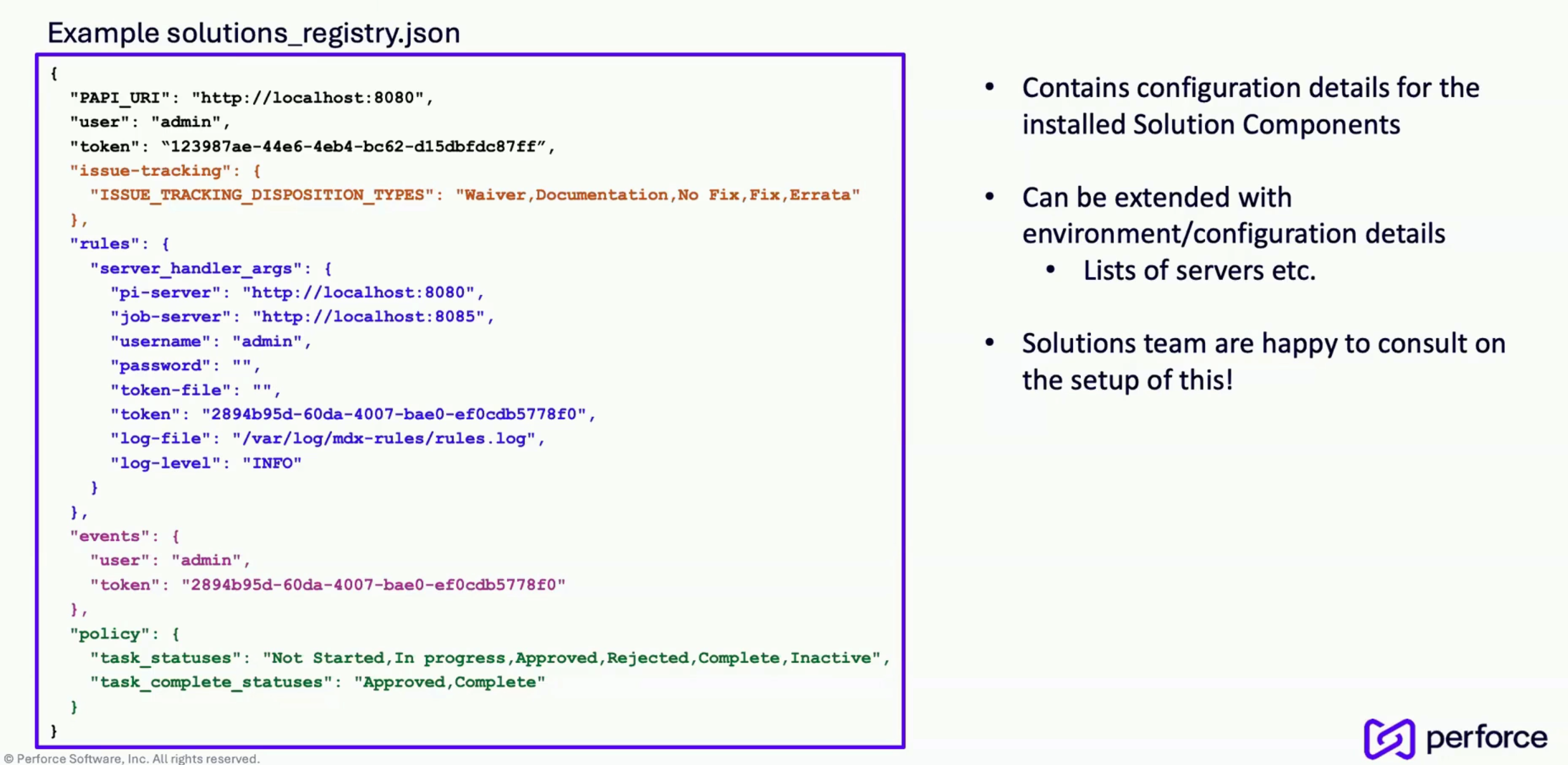
To help our solutions find your custom files, we use a solution registry. This is a JSON file that centralizes configuration details for installed solution components. It tells our packages where to find scripts and settings for features like issue tracking, the rules engine, and event listeners. By centralizing this information, the solutions registry simplifies management and provides a quick overview of your setup for support teams. It can be extended to include server details, IP addresses, and data management settings, creating a single source of truth for your entire IPLM infrastructure.
Final Recommendations
The value of your Perforce IPLM platform depends on a commitment to proactive management and maintenance. By implementing these best practices, you can ensure your platform remains stable, secure, and always ready.
To summarize:
- Prioritize backups and regularly test your disaster recovery plan.
- Monitor server health and manage system resources like log files.
- Update software so that you leverage the latest user and security features.
- Monitor your system and remain alert to potential issues.
- Standardize your configurations and manage them under version control.
Perforce continuously updates its products based on user feedback. If you have questions or need help implementing these practices, please reach out to your account executive.