
Blog
January 27, 2026

70% of teams are already integrating generative AI tools into their daily workflows, according to our 2025 State of Game Technology Report. Now more than ever, teams are looking to connect their AI tools to the services and applications they rely on to get work done.
To address this issue, the industry has begun to standardize using the Model Context Protocol (MCP) to connect their existing tools and LLMs like Claude, GPT, and Gemini. This blog will explore what a model context protocol is, explain how it works, and suggest how your team can implement it with potential use cases.
To first understand what MCP is, we must also understand LLMs and how they connect.
Back to topWhat Is an LLM?
An LLM (Large Language Model) is a deep learning model trained on vast amounts of data. LLMs can interpret natural language, and they can generate text, code, multimedia, and more.
Unlike conventional algorithms that often rely on rigid commands and strict syntax, LLMs are trained to grasp meaning and nuance. This enables humans to communicate with machines in a way more like how we communicate with each other.
When most people mention AI, they are referring to LLMs, which is just one area of the much larger machine learning and AI field.
Explore the relationship between DevOps maturity, AI success, and economic performance in Perforce's 2026 State of DevOps report >>
Back to topWhat Is the Model Context Protocol (MCP)?
Model Context Protocol (MCP) is an open standard that streamlines connectivity between AI systems and external data sources and tools.
Think of MCP as a 'plug-and-play' system for AI: it simplifies and unifies the way models interact with things like your calendar, files on your computer, or data in your version control system.
Early on, LLMs operated in a 'walled garden', limited strictly to their pre-trained knowledge. While the introduction of tool-calling features finally allowed models to access external data and perform actions, the ecosystem remained fragmented. MCP creates a standardized, consistent way for models to call tools. With MCP, the ecosystem has become more seamless to use for both tool users and builders.
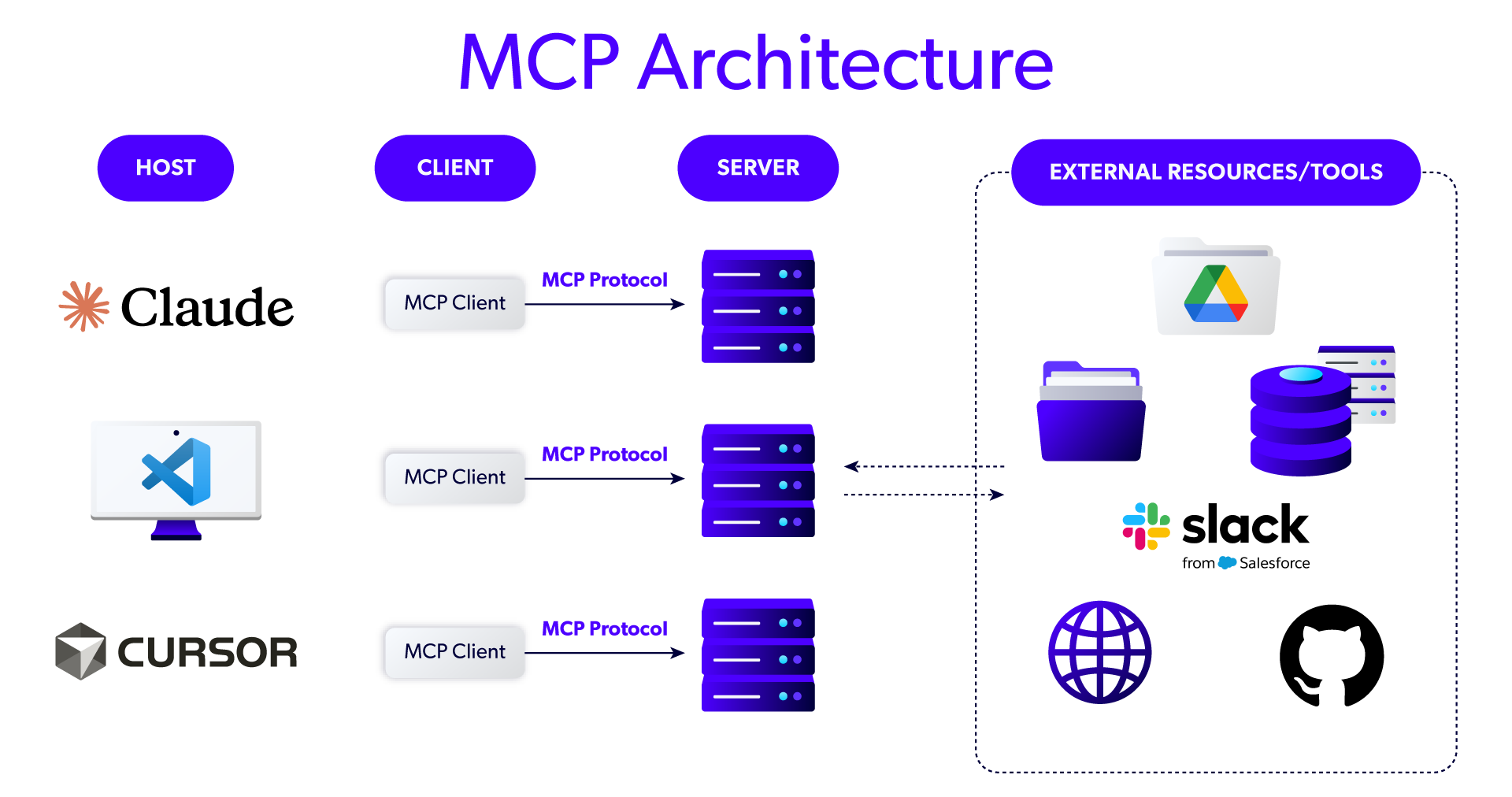
MCPs work through three main components—an MCP Host, an MCP Client, and an MCP Server. Together, they make it easy for AI models to interact with outside systems.
MCP Host
The MCP Host is the AI application itself, such as Claude Code, GitHub Copilot, or AI-powered IDEs. The MCP Host is the main interface for users. When you ask the AI tool to do something that requires outside data or external tools, it can reach out to the relevant MCP Server to make it happen.
But how does that happen?
MCP Client
The MCP Client bridges the gap between the MCP Host and its MCP Server of choice.
The MCP Client handles the communication back-and-forth, so that when your AI tool needs to access those external resources, it can do so reliably. In this way, the MCP Client helps augment your AI tool with the outside information (additional "context") it needs to get its work done most effectively.
What Is a MCP Server?
The MCP Server sits in front of the actual external data and tools themselves. It surfaces all of that in a way that MCP Clients (and, thus, the AI tool itself) can readily consume and understand.
 Back to top
How to Implement the Model Context Protocol
Implementing an MCP Server is a great way make your product, data, or just about anything else readily consumable by AI tools. Before diving into setup, it is helpful to understand the two primary deployment models: local MCP servers and remote MCP servers.
Deployment Option | Description | Tradeoffs | Additional Details |
Remote MCP Server |
|
|
|
Local MCP Server |
|
|
|
MCP Implementation Best Practices
Treat it like a real API, because it is: Focus on security, availability, authentication, and access control.
Machine-friendly design: Use standardized data formats, self-documenting errors, and clear documentation for tools to ensure easy consumption by LLMs.
Avoid tool overload: Don’t overwhelm LLMs with excessive tools. Be selective and deliberate about which tools to expose.
Consider context limits: Keep tool descriptions concise to avoid overloading an LLM’s context window, which can degrade performance.
4 Practical Use Cases for MCP
To better illustrate how MCP works, here are four ways it can be combined with AI tools to improve efficiency and reduce manual effort:
Codebase Navigation, Analysis and Updates
Connect your AI tool to your version control system. Then suggest one of the following prompts:
"Summarize the recent changes to our authentication logic."
"Which developers should I ask if I have questions about the login screen?"
"Please make a new branch for the work I'm currently doing. Commit my changes to that branch and get it ready for peer-review."
CI/CD Integration and Automated Testing
Connect your AI tool to your CI/CD system. Then you can prompt your AI tool with the following:
"Run our test suite. Summarize the results for me, showing me just the exceptional or notable items."
"Fetch the results from the last time we ran our performance tests. Then do a fresh run. Compare the new results to the previous baseline and give me a summary."
Compliant Requirements Management and Visualization
Connect your AI tool to your requirements management system. Then you can prompt your AI tool with a version of the following: "Find the highest-priority items that are still pending and generate a visual of the dependencies between them."
Cybersecurity
Connect your AI tool to your security scanning toolchain. Then ask: "Run static analysis on the entire codebase. Identify any issues that are medium severity or worse."
By combining multiple MCP servers, you unlock the potential for more powerful and complex interactions. For example, if your AI tool is connected to both a revision control system and a static analysis tool, you can issue sophisticated requests like: "Run static analysis on the current release branch of this project. For each identified security issue, check the revision history to determine how long the bug has existed and which developers contributed to this component."
This interconnected approach allows tools to work together seamlessly, enabling insights and actions that wouldn’t be possible in isolation. The whole truly becomes greater than the sum of its parts.
Back to topConclusion
MCP is a game-changer for both builders and users. For builders, it provides a standardized way to make their tools and data easily accessible to AI systems. For users, it makes their AI tools more powerful by seamlessly connecting them to external tools and data sources, unlocking new possibilities and efficiencies.
At Perforce, we’re embracing MCP to make our products more accessible and easier to use. By implementing MCP Servers for our solutions, we’re reducing friction and creating AI-friendly integrations that work smarter, not harder. Our goal is simple: to meet users where they are and make it effortless to tap into the full power of our tools. When we do that, everyone wins.
Explore how Perforce is shaping the future of AI-powered development with Perforce Intelligence. With MCP-enabled solutions like the Perforce P4 MCP Server, BlazeMeter MCP Server, and Puppet Infra Assistant MCP Server, we’re helping teams unlock the full potential of AI in DevOps. Take your AI strategy to the next level.