
Blog
August 20, 2026
How Perforce Built an AI Agent Orchestrator for Code Review, QA, and Bug Fixes

AI,
Digital Creation & Collaboration,
Coding Best Practices
It Started with a Question: Where Can AI Save Our Team Time?
In April 2026, when our Perforce engineering team was introduced to Claude, my team didn't jump straight into using it. We sat down, mapped our entire development lifecycle, and asked one focused question:
Where does AI create the highest impact for us, specifically?
Not for AI in general. Not for some hypothetical engineering team. For us. For the P4 Code Review team. For the workflows we actually run every single day.
What came out of that exercise was not a list of features we wanted to automate. It was a clear picture of where our engineers were spending time on work that — honestly — a well-designed system should be able to handle. Bug triage. CVE patching. QA cycles. Release note generation. Repetitive fixes that followed the same pattern every single time.
The goal was not to replace engineers but to reduce repetitive work so they could spend more time designing new capabilities, solving architectural problems, and improving our products.
The result: The Perforce Agent Orchestrator.
Back to topBuilding the Army: The Specialized AI Agents Behind Our Code Review System
Our first instinct was not to build one generic AI assistant. It was to build a set of specialized agents where each focused on solving a single problem (and doing it really well):
- A Bug-Fixing Agent that reads a Jira ticket, analyzes the codebase, identifies the root cause, writes the fix, updates the unit tests, and validates the changes locally — all without a human touching a keyboard.
- A CVE Fix Agent that monitors vulnerability databases, identifies impacted packages in our codebase, and generates patches automatically.
- A QA Agent that generates Cucumber-based functional tests, runs Docker preflight checks, and produces a confidence score before anything advances.
- A Release Notes Agent that reads every candidate ticket, every commit, every testing comment, applies our documentation guidelines, and produces publication-ready release notes.
- A Slack Agent that monitors our support channel around the clock, reads incoming messages, extracts technical context, and creates Jira tickets automatically when a customer reports an issue.
We call this our Army of Agents. Every single one was built by our team from scratch and for our specific workflows.
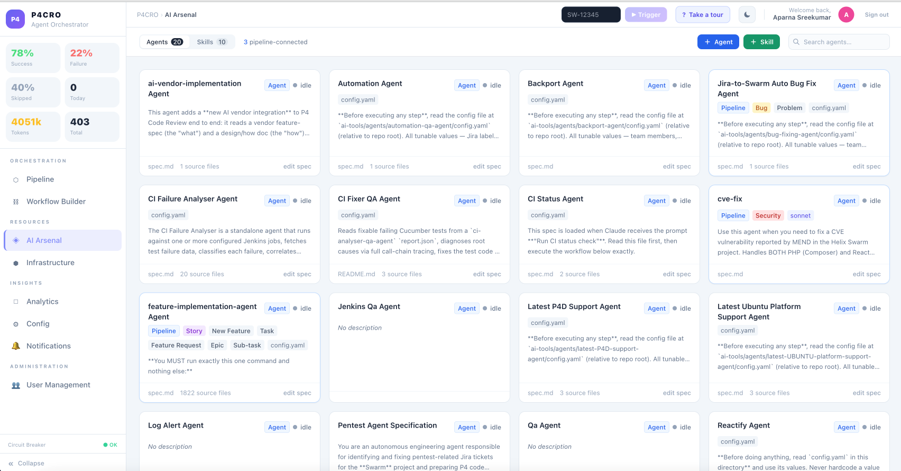
But here is what we learned quickly: Having powerful agents is one thing, having them work together intelligently is something else entirely. We needed something to manage these agents in a productive way.
Back to topThe Missing General: Why AI Orchestration was Crucial
Who decides which agent picks up which ticket? What happens when one fails? When does it escalate to a human? How does it know when it is not confident enough to proceed?
We had the army. We needed a general.
That gap led us to build the orchestration layer, essentially a central nervous system that coordinates every agent, every pipeline stage, and every decision point. The Perforce Agent Orchestrator is not just automation. It is controlled orchestration. That distinction matters enormously.
Back to topHow Our Agent Orchestrator Works
Let's walk you through what happens when a customer reports a critical bug. Imagine it is Christmas Day. The entire P4 Code Review team is on holiday. A customer hits a production issue and reports it to support.
Here are the 7 steps that occur without anyone touching a keyboard:
- The Slack Signal: Our Slack Agent is always listening. When it encounters a bug report, it reads the message, extracts the technical context, and creates a Jira ticket automatically. Our scheduler, running every hour, picks up that ticket and feeds it into the pipeline.
- The Eligibility Check: This is pure rule-based logic — zero AI cost. The system validates whether the ticket is ready for automation. Is there enough detail? Is the scope manageable? Is someone already working on it? If it can’t be automated, the ticket is labelled AI-SKIPPED with a clear reason. No wasted compute. No bad fixes.
- Agent Routing: If the ticket qualifies, the Router reads it, classifies it, and dispatches it to the right agent. Bug fix? They get routed to the Bug-Fixing Agent. CVE? They get routed to the CVE Fix Agent. Feature? They go to the Feature Implementation Agent. Each task is precisely directed. No ambiguity.
- Bug Fix Generation: The Bug-Fixing Agent gets to work. It reads the codebase, finds the root cause, writes the fix, updates unit tests, and validates everything locally. The orchestration layer tracks every step including token usage, retry count, timing, model used and then logs them on the visible dashboard.
- QA and Confidence Scoring: Once the fix is ready, the QA Agent takes over automatically. It generates functional tests, runs preflight checks, and produces a confidence score based on a series of carefully monitored concrete signals. The confidence score is not a black box. It is calculated from concrete signals: whether generated tests pass, how much of the changed code they cover, whether the fix introduces regressions, and how closely the result aligns with the original ticket. We also watch for subtler warning signs, such as an agent modifying existing tests to make a fix appear successful. Clean tests, strong coverage, and no regressions move the work forward. Failing tests, thin coverage, or unexpected side effects route the work to a human QA engineer.
- Human Code Review: The fix then goes into P4 Code Review. A human reviewer looks at it. If they comment — the Review Monitor Agent picks it up, routes it back to the right agent, and the loop runs again. Automatically. No dropped threads.
- Build and Deployment Staging: When everything passes, the Jira card is stamped AI-DONE, Jenkins fires, the build runs, and the fix is staged for the team to deploy.
From a customer Slack message on Christmas Day, to a production fix. Zero human intervention required. No engineers pulled away from their holiday.
Back to topThe Needed View into Your AI Army’s Work
Every step of this pipeline is visible. The Orchestrator dashboard gives the team a real-time view across every ticket: what stage it is at, which agent is working on it, how many tokens were consumed, what the confidence score was, and why anything escalated.
The Analytics module gives your leads the numbers that matter: tickets resolved, success rates, escalation breakdown, token consumption. Not vanity metrics.
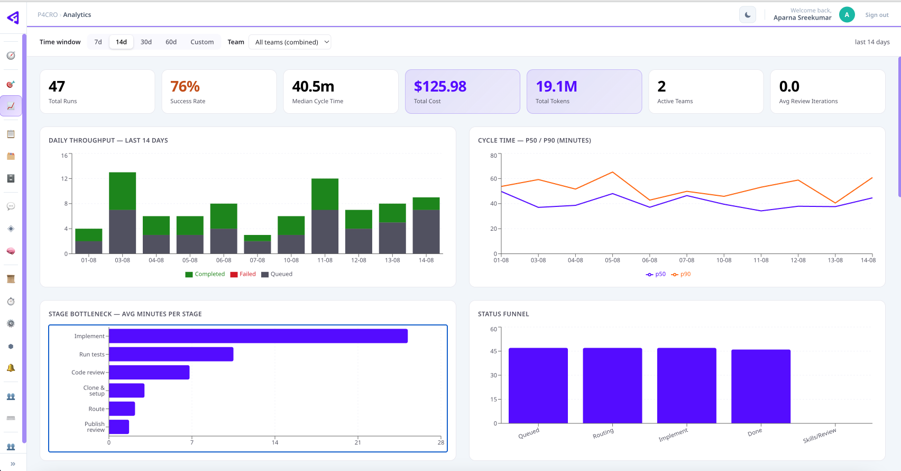
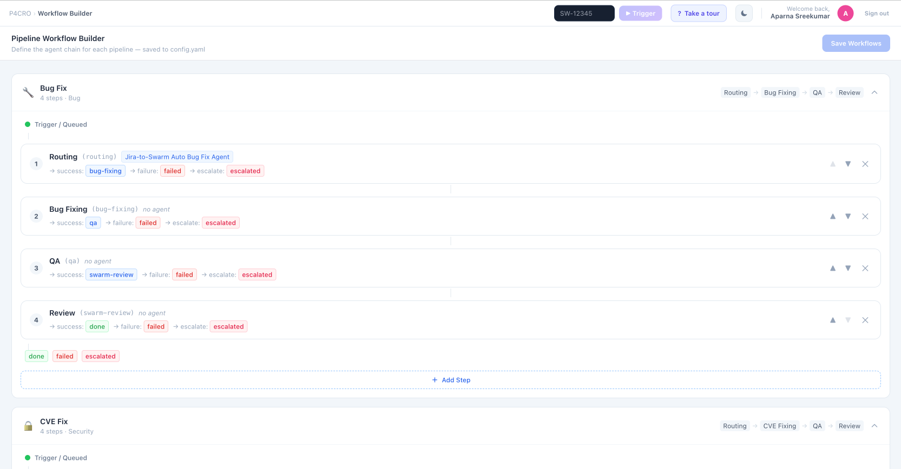
Additionally, the Workflow Builder lets any team member reconfigure a pipeline without touching code. Want code review to happen before QA instead of after? Drag it, save it, done. The next run picks it up.
 Back to top
The Result: Faster Releases, More Documentation, Less Repetitive Work
Release cycle: 3 months → 2 months.
Release notes content: nearly doubled.
Since we built the Agent Orchestrator, our release cycle has compressed from three months to two. Our release notes content have nearly doubled in quantity. CVE patches that previously took days are now resolved autonomously. Bug fixes are being built, tested, reviewed, and deployed without pulling engineers from their sprint work.
With the repetitive load lifted, our engineers spend their time where it counts: architecting new capabilities, tackling complex problems, and pushing the product forward. That's the real reward.
Happy engineers doing meaningful work. Happy customers getting fixes faster than they expected.
Back to top4 Lessons from Building Our Agent Orchestrator
A few things stand out from this journey that are worth sharing with any team thinking about building something similar.
- Specificity beats generality. We did not try to build a general-purpose AI system. We built agents for our specific workflows, our specific codebase, and our specific pain points. That specificity is what makes them effective.
- Confidence scoring is not optional. Every agent checks its own confidence before advancing. If it is not confident enough, it escalates. This is what makes the system trustworthy. It never guesses.
- Human gates are a feature. We deliberately kept human approval checkpoints in the pipeline. Not because we do not trust the agents, but because trust is earned gradually.
- The orchestration layer is the hard part. Building individual agents is satisfying and relatively fast. Building the layer that coordinates them is where the real engineering challenge lives. And it is where the real value is created.
4 Tips for Better AI Development
We are currently expanding the army. More agents. More skills. Higher automation ceilings. And we are working toward reducing the number of manual gates as confidence in the system grows.
If your team is thinking about where to start with AI-driven engineering, my advice is simple:
- Map your own pain points.
- Build for your specific workflows
- Start with one agent that does one thing well
- Invest in the orchestration layer early in your process
The final step is what turns a collection of useful tools into a system that will accelerate how your team delivers.
Back to topThe foundation is built. The army is assembled. The general is in command.
Build Your AI Workflows on a Trusted Foundation
Running AI agents is relatively easy. Building secure and reliable workflows around them is where the real challenge begins.
If your team is developing with AI, P4 is a technology-agnostic version control platform that provides the provenance, protection, and control you need to automate workflows and make tools like our Agent Orchestrator. Check out P4 Free if you’re looking for a self-managed solution, or P4 Cloud for our hosted and managed solution.
For more information, see Why P4 for AI.