
Blog
May 28, 2026
Perforce P4 vs Git for AI Coding Agents: Why Parallel Development Hits a Merge Wall
Version Control,
Data Management,
Digital Creation & Collaboration
A few months ago, a CTO I respect posted on LinkedIn that he was thinking about going back to Perforce P4 or SVN. He runs a modern engineering org and uses Git. The trigger was that his AI coding agents were stomping on each other’s changes faster than his developers could reconcile them.
That post isn’t an outlier. It’s an emerging pain point in AI-driven workflows.
If you’re running more than a few AI coding agents against the same repository with Claude Code, Cursor agents, Copilot agent mode, whatever your stack is; you’ve probably felt the same friction. Branches that won’t rebase cleanly. Two agents independently inventing error_handler.cpp and error_manager.cpp for the same job. Force pushes that orphan another agent’s work. A constant background hum of merge conflicts that no one quite owns.
This is the merge wall. And it isn’t a problem with your agents. It’s a problem with the assumptions baked into the version control system you have working underneath them.
What follows is a deep look at what’s actually happening under the hood — three-way merges, mutual inserts, directory-level conflicts, the DAG and how Git uses it, integration records and how P4 uses them. We’ll work through two real merge scenarios in depth and see where each system’s design assumptions hold and where they don’t.
Back to topGit Was Built for a Different Shape of Collaboration
Before we dig into the mechanics, let's discuss the design context that explains a lot of the friction.
Git was designed for the Linux kernel. Linus Torvalds maintains the main repository. Hundreds of contributors send him patches. He pulls the ones he wants, rejects the rest, and his repo is the source of truth. Git’s distributed model, its history-rewriting tools, its “everyone has a full clone” architecture — all of it is exquisite for the problem of one maintainer reviewing patches from many contributors. In that paradigm, change history is a story curated for review.
An AI agent workflow has the opposite shape. There is no single maintainer. There is a rolling review queue. There are several agents that need to ship simultaneously into a single mainline, with parallel autonomy and an audit trail. History isn’t a curated story; it’s an operational record of what got written, by which agent, against what base. The questions you ask of the version control system are different — closer to “who has what open right now?” and “what was the actual ancestry of this line?” than to “is this patch good enough to apply?”
Perforce P4 was built for the opposite shape from the beginning. Many concurrent contributors. A single source of truth. Server-authoritative metadata. Per-file coordination. Integration records preserved durably across every operation.
Git is excellent at the problem it was designed for, and plenty of teams use it successfully in workflows that look nothing like the kernel. But when the mismatch between Git’s design assumptions and your workflow’s needs gets large enough, you start to feel the friction in specific places. The rest of this piece is about where those places are, what’s actually happening, and how the design of each version control system affects them.
📑Additional Resource: Git vs Perforce P4: How to Choose (and When to Use Both)
Back to topThe Mechanics: Three-Way Merge and the Common Ancestor
Modern software development depends on branching and merging, yet merging remains one of the most error-prone operations in version control. A common assumption is that merging means comparing two files and combining them. In reality, a proper merge requires three files:
- Yours — the version in the branch you’re merging into
- Theirs — the version in the branch you’re merging from
- Base — the common ancestor where the two branches diverged
Without the base, the merge tool has no way to tell which changes are intentional and which are unchanged background. With the base, the tool computes two diffs — diff(Base, Yours) and diff(Base, Theirs) — and applies both sets of changes. If both diffs touch the same region, that’s a conflict, and a human gets called in.
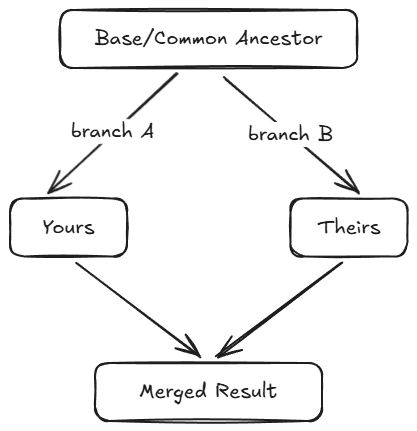
Suppose the base file is:
Line A
Line B
Line C
In Yours. Line B is gone:
Line A
Line C
In Theirs, Line D is added:
Line A
Line B
Line C
Line D
A two-way comparison can’t tell you what to do — Yours is missing Line B, Theirs has Line D, should Line B be in the result or not? With the base, it’s clear: Line B was in the base and got deleted in Yours, so the deletion is intentional. Line D wasn’t in the base and got added in Theirs, so the addition is intentional.
The correct result is A, C, D:
Line A
Line C
Line D
This only works if the base is the nearest common ancestor. Use a more distant one and changes that were already incorporated in a previous merge round reappear, producing false conflicts or, worse, silently wrong results.
How that nearest-ancestor lookup happens is where Git and P4 diverge structurally — and to talk about it precisely we need one term.
A quick word on the DAG
A Directed Acyclic Graph is a network of nodes connected by arrows where you can never have an infinite loop. Git uses one to represent commit history: each commit is a node; each commit points backward to its parent (one parent for a regular commit, two for a merge commit). Directed means the arrows have a direction — a commit knows its parents, but a parent doesn’t know its children.
When git merge-base needs to find the common ancestor of two branches, it walks backward from both tips through the parent pointers, looking for the lowest commit reachable from both. That commit is the merge base.
The catch is that git merge-base walks whatever the DAG currently is, not what it was when your branch originally diverged. Rebase and amend create new commit objects with new hashes; the old ones exist in the repository until garbage collection but are no longer reachable from any branch. Squash-and-merge collapses a branch’s commits into one and discards the parent pointers that connected them to the original base. The nearest-common-ancestor calculation can only see the post-rewrite graph.
Perforce P4 takes a different approach. Every integration of a file (merge) writes an explicit record on the server: which source revisions were integrated into which target, at what changelist. Those records aren’t subject to client-side rewriting because P4’s design doesn’t grant clients that operation. The next merge reads them directly.
Both designs are internally consistent — they’re optimizing for different things. Git’s design optimizes for client autonomy and a clean, presentable history. P4 optimizes for durable server-side lineage. That distinction is going to matter a great deal in the next two sections.
Back to topMerge Challenge #1: Mutual Inserts and the Lineage Question
Here’s a simple example of a real problem in textual merging, and it gets worse with AI agents.
Two agents working in parallel, both add code in the same place, and the merge deduplicates that line. Sometimes that’s correct: if both add #include <string.h> to the same header, the merge tool deduplicates and you get one copy. That’s the right answer.
But consider this. The base contains:
Group->AddFruit("banana");

Count++;

// Add more here
In Theirs, a different agent has added apple but also removed the comment:
Group->AddFruit("banana");

Count++;

Group->AddFruit("apple");

Count++;
In Yours, your agent has added orange:
Group->AddFruit("banana");

Count++;

// Add more here

Group->AddFruit("orange");

Count++;
The merge result (with semantic conflict):
The merge tool sees that both branches added Count++ in the same relative position with identical text so it dedupes. You get one Count++ when you needed two. The textual merge succeeds but the behavior is wrong. There is no conflict marker, and the CI may pass if the test isn’t precise.
Group->AddFruit("banana");

Count++;

Group->AddFruit("apple");

Group->AddFruit("orange");

Count++;
This is a semantic conflict, and no merge tool alone can detect it because correctness depends on what the code means, not what the text looks like. That’s true under any version control system. The textual-merge layer is at its limit.
But code review is the next layer up, and code review increasingly means AI review. What an AI review agent can see in the merged file is determined by what the VCS preserved about how the file got that way. This is where the choice of VCS matters in a way that doesn’t usually come up.
In Perforce P4, both edits to the file maintain the same base that they were branched from. This means that neither merge can overwrite the history, which makes it possible for a human or agent to see that both edits separately added Count++ to the file. Commands like p4 merge3, p4 annotate or the visual P4Merge tool can help to discover that both edits added the increment.
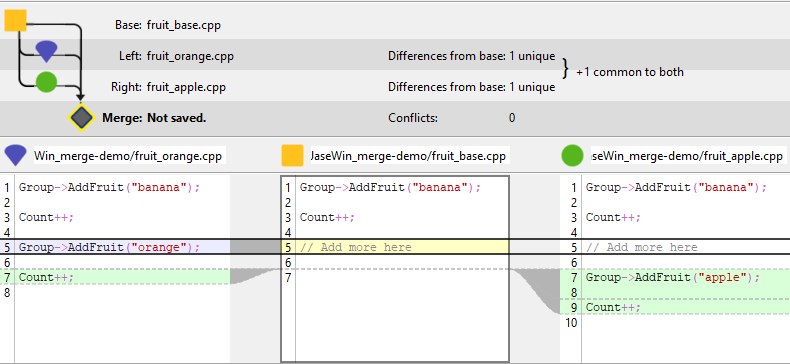
In Git with squash-and-merge — the GitHub default. When Yours branch and Theirs branch each get squash-merged into main, both branches’ individual commits collapse into one squashed commit per merge. The DAG shows one squashed commit per merge. In the first one, one AddFruit and one Count++ are added, but in the second merge, we only see an AddFruit. Any record that the second merge also had a Count++ with is gone forever, erased from the shared history. There is no Git-native record that two Count++ additions ever existed. To recover that context the agent would have to parse commit messages (assuming they were detailed enough), get pre-squash commits through another system (if one is tracking that), or have been listening at PR-merge time.
The git standard of squash-and-merge produces a clean linear history that the kernel-style review workflow values. The trade-off is that pre-squash lineage isn’t structurally queryable afterward.
In Git with rebase-and-merge. Even without squash, git rebase rewrites each commit’s parent pointer. The pre-rebase parent — which would have shown “this Count++ was added on a branch that diverged from main at commit X” — is replaced by a new commit that has different changes (more on this in section 3 below). The “what was the original merge base when this change was authored?” question becomes unanswerable from the DAG.
The Count++ bug is inevitable under any VCS, but P4 preserves the lineage that lets the next layer of review notice. The merge issue can still happen, but the evidence needed to catch it is still on the server.
Merge Challenge #2: Directory-Level Drift and the Coordination Gap
Conflicts also happen above the file level, and these also show up often in agent workflows.
Suppose three agents are tasked with “improve error handling” in the same module. Agent A creates error_handler.cpp. Agent B creates error_manager.cpp. Agent C inlines error handling into existing call sites. None of the three implementations is wrong individually. Together they leave the codebase with three competing error-handling strategies.
The version control system sees three new files at different paths plus inline edits to existing files. No filename collision, no overlapping line changes. The textual merge produces no conflict. Each subsystem’s tests pass in isolation. By the time anyone notices, three subsystems exist and the bug is structural — it isn’t a one-line fix.
The full revision history or pull requests could eventually surface that three agents independently scaffolded error handling. But for this failure mode, eventually is too late. The lever needs to be pre-conflict, not post-conflict.
What P4 gives you here. The p4 opened command is a server-side query that returns the list of files currently open for edit. With -a it includes other users; with a depot or stream scope it returns just what you care about.
So:
p4 opened -a //myproject/main/... (to check a specific branch/stream)
or
p4 opened -a ... (to use the current workspace)
… returns every file currently open for edit under that scope, by which user, in which changelist, with the change description that user populated when they opened the file. An agent that runs it before deciding to scaffold error_manager.cpp sees that Agent A already has error_handler.cpp open with a description “scaffold error handling for module X.” That means the agent identifies the overlap before the conflict, rather than hoping someone detects it later.
The pattern is straightforward in any agent harness that can run a shell command before edits. The agent’s pre-edit hook runs p4 opened -a against the workspace, the agent reasons over what’s in flight, and the agent populates its own change description at p4 edit time so that the next agent’s query surfaces its intent. Some teams have started experimenting with packaging this as a Claude Code skill or a Cursor configuration; the underlying capability is the p4 commands themselves, which work today against a stock P4 server.
In Git there is no equivalent server-side query. Each agent works locally. There is no Git-native notion of “I’m about to start working on this file.” The earliest signal another agent receives is when a pull request opens, and at that point the file already exists. Forge-level conventions — draft PRs, branch-naming patterns, project boards — can simulate some of this, but they’re layered above the VCS rather than properties of it, and they must be re-implemented per forge.
Agents work fast enough that conflicts happen before humans can coordinate. The coordination lever has to be available to agents and humans inside the VCS, queryable in milliseconds, available before any code is written. Perforce’s server-side in-flight view fills that role today.
Back to topMerge Challenge #3: History Rewriting and Lost Context
Beyond merging itself, Git provides several operations that rewrite history. They help make things pretty — clean linear history, fixed-up commit messages, merge-time consolidation — and in a human-paced workflow the trade-offs are usually worth it, because the volume is manageable and a maintainer is reviewing. In agent-paced workflows, those same trade-offs land differently.
Briefly, what each operation does:
- git rebase replays a branch’s commits onto a different base, creating new commit objects with new hashes and new parent pointers.
- git commit --amend replaces the most recent commit with a new commit object, also with a new hash.
- git push --force replaces the remote branch’s history with the local history, discarding what was there.
- squash-merge collapses a branch’s commits into one and discards the parent pointers of the squashed commits.
The trouble starts when a branch is based on a commit that history-rewriting has made unreachable:
Original history (shared):
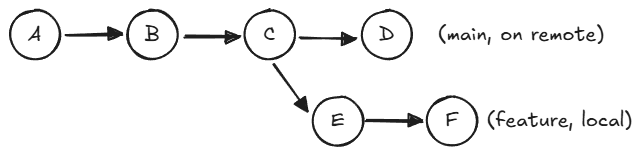
After force push:
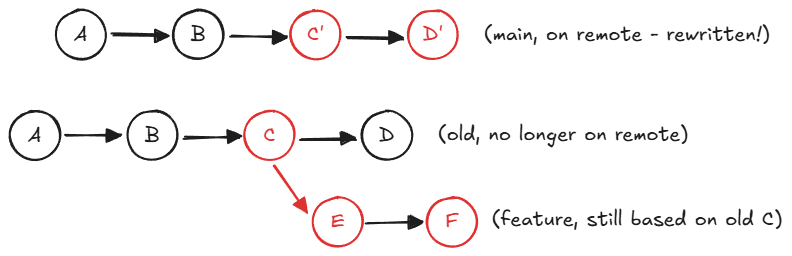
Now the feature branch’s parent (the old C) is no longer reachable from any branch on the remote. When the feature developer tries to merge or rebase onto the new main, git merge-base can’t find the original ancestor. It falls back to a much older commit — in this example, A — and the diff between A and the current state is enormous, full of changes that aren’t actually conflicts, just history the feature branch never had a chance to see.
In a human-paced workflow when this happens, a human usually catches it and has to deal with the brief headache of figuring out what should be done. In an agent-paced workflow it happens constantly, because the usual pattern (open a branch, do work, open a PR, rebase/squash and merge) runs at least one history-rewriting operation on every change. For ten agents shipping ten changes an hour, that’s hundreds of rewrites a day, and if multiple problems are added to each other, it is easy to get in a state where it can't be easily unwound.
Perforce P4 sidesteps this not by being more disciplined but by structuring its operation set differently. There is no client-side history to rewrite. The server is authoritative. Integration records survive every operation because no client operation can rewrite them. That has its own trade-offs — less local autonomy, no “rebase to clean up my branch” workflow — but the audit trail is durable and no history can be lost. Any state can be recovered in the future and all changes can be audited by agents or human code reviewers.
A note on attribution. Once a meaningful share of your codebase is AI-generated, you need to know which share — for compliance review, security audit, or AI-adoption metrics. That requires durable change attribution. P4’s p4 attribute lets you attach arbitrary key-value metadata to a file revision: model, version, prompt context, agent identity, anything you want to query later. Because the underlying server history doesn’t get rewritten, those attributes survive and are tied to specific versions of files, not just the file path.
Back to topHow Perforce P4 and Git Differ Operationally
Both systems do three-way merges. The interesting differences are in when conflicts get detected, how the system protects you while you resolve them, and what assumptions each makes about who’s in charge and how valuable integration history is.
When a P4 developer submits a changelist, the server checks every file against the latest version. If anything has been changed by another submission since the last sync, the submit is rejected until the developer resolves. The conflict resolution is per-file: a submit conflict on auth.go doesn’t block submits to database.go. Other parallel work proceeds. The resolve itself uses p4 resolve and offers several modes — accept yours, accept theirs, automatic merge if there’s no textual conflict, or a manual merge in your visual diff tool.
Git’s merges happen locally on the developer’s machine. There is no ability to lock files. Two developers — or two agents — can be resolving the same conflict on the same files at the same time, and the one to push wins. Everyone else has to pull again and re-resolve, potentially losing history or getting caught in a loop.
Neither model is universally better. Git’s is more flexible for asynchronous distributed work where contributors aren’t expected to be online at the same time. P4’s is more deterministic when many contributors are writing into the same mainline at once.
| Aspect | Perforce P4 | Git |
| Conflict detection | At sync or submit time, per-file | At merge time, whole repo at once |
| Locking | Per-file | None (git lfs has some locking abilities) |
| Merge base tracking | Immutable on the server | Commit DAG traversal, fragile under rewrites |
| History integrity | Immutable on the server | Mutable (rebase, force push, squash) |
| File-level granularity | Each file independently | Whole-commit |
| In-flight visibility | p4 opened -a (server-side,today) | None, except PR opens or draft PRs |
| Code attribution | p4 attribute (changelist-level) | Commit-author metadata only |
How to Run Multiple AI Agents on a P4 Server
A few concrete patterns to put in place if you’re running multiple AI agents against a shared P4 server today.
Pre-edit coordination. In your agent’s harness, run p4 opened -a ... as a pre-edit hook. Surface the in-flight edit list to the agent before it decides what to scaffold. Have the agent create a changelist with a task description at p4 edit/add/delete time so other agents and humans know their intent.
Batch operations. P4’s relational backend handles sets well; it handles a hundred sequential individual operations less well. An agent that calls p4 edit a hundred times in a row puts a hundred sequential locks on the working table; an agent that batches the same hundred edits into one call is much faster. In most workflows, an agent wouldn’t simultaneously edit 100 files at once, but if your workflow does, adding batching is a small change with a large payoff.
Code review around lineage. When reviewing a merged change in P4, walk the integration history with p4 annotate -I and use the revision timeline and timelapse views in P4V. Look for mutual-insert signatures — the same line added by different authors against the same base. An AI review agent can also be taught to do this analysis programmatically.
Attribution. Have agents add a p4 attribute for AI-authored files. Tag the agent identity (model, version, prompt context) at commit time. That gives you a file revision-level audit trail you can query later.
Hygiene that still applies. Keep branches short-lived. Merge from main into feature branches frequently. Try using fewer branches and take advantage of P4 shelves and P4 Code Review for small changes, simplifying your integration history. Test after every merge. Protect mainline history — no force pushes to shared branches. What changes in agent workflows is that hygiene by itself isn’t sufficient; you also need the in-VCS coordination layer above.
Back to topChoose the Best System for Parallel Development
Merging is a deceptively complex problem dressed up as a simple one. What looks like “combine these two sets of changes” is actually a lattice of base selection, lineage preservation, mutual-insert handling, directory-level conflicts, semantic correctness, and history integrity. Both P4 and Git solve parts of it well. Neither replaces human judgment.
The question isn’t which system is better in the abstract. The question is which system’s design assumptions match the workflow you’re actually running. If your workflow looks like one maintainer reviewing patches from many contributors, Git is excellent — it was designed for exactly that.. If your workflow looks like several AI agents writing simultaneously into a shared codebase, with an audit trail and a need to keep moving, the centralized, file-locked, lineage-preserving model of P4 fits the shape better.
Try Perforce P4 in Your AI Workflows
Break through the merge wall with speed and control. Perforce makes it easy to move your workflows from patchwork recovery to accelerated parallel development safely and securely.
Try P4 free for up to five users, backed by expert guidance, to see how it handles codebase generated by multiple AI agents while providing clear visibility for audit trails.
Back to topFrequently Asked Questions about Perforce P4 and AI Coding Agents
What is a merge conflict?
A merge conflict happens when two branches modify the same region of the same file in ways the version control system cannot reconcile automatically. The system asks a human to choose which change wins, or to combine them. Merge conflicts can also occur at the directory level, when two branches add or rename files in incompatible ways.
What is a DAG and why does it matter for merging?
A Directed Acyclic Graph is the data structure Git uses to represent commit history: nodes are commits, arrows are parent pointers, and there are no loops. When Git needs to find the common ancestor of two branches, it walks backward through the DAG from both tips. The catch is that operations like rebase, amend, force-push, and squash-merge change what the DAG looks like — and once the DAG is rewritten, the original ancestry is no longer queryable from Git. P4 takes a different approach: it records each integration explicitly on the server, so lineage is preserved regardless of client-side operations.
How does P4 handle merge conflicts differently from Git?
P4 detects conflicts at submit time, server-side, and can lock the affected files while the developer resolves them. Merges and resolves are done per file, so a conflict on one file doesn’t block other parallel work. Git detects conflicts at merge time, client-side, across the whole commit, with no locking — last push wins, and other developers have to pull and re-resolve.
How do I avoid merge conflicts with multiple AI coding agents?
The most useful pattern available today is to have each agent declare its working set before editing — open files for edit in P4 (which broadcasts intent server-side), populate the change description, and check p4 opened -a ... to see what other users/agents are working on before scaffolding new code.
How does an AI review agent catch mutual-insert bugs?
For a semantic conflict like the Count++ example in this piece, the textual merge produces a clean file with no conflict markers — the bug is invisible at the merge layer. An AI review agent can catch it by walking the lineage of each line in the merged file. In P4, p4 annotate -I returns integration-attributed lineage line by line, and commands like p4 merge3 <base> <theirs> <yours> let the agent can see that two Count++ lines came from different authors against the same base. In Git, that lineage is typically not queryable after a squash-merge or rebase, so the agent has less to work with.
Can P4 work with Claude Code, Cursor, or Copilot?
Yes. P4 exposes a command-line interface (p4) and an MCP server (P4 MCP) that any agent harness can call. The coordination patterns described in this article — pre-edit hooks that surface in-flight work, batched edit operations, attribution at commit time — are pattern-level recommendations that any agent that can be configured to run a pre-edit script can adopt.
What is Git rebase vs Git merge?
Git rebase rewrites the history of a branch to appear as if its changes were made directly on top of the target — new commit objects, new hashes, new parent pointers. git merge preserves the divergent history and adds a merge commit. Rebase produces cleaner history but rewrites parent pointers, which can make the original merge base unreachable from the DAG. In agent-paced workflows that run rebases constantly, the loss of pre-rebase lineage compounds. P4’s integration model captures the benefits of both without the trade-off, because integration records live server-side and aren’t subject to graph rewriting.
How does P4 track AI-generated code?
P4 attribute lets you attach key-value metadata to a file revision — model, version, prompt context, agent identity, whatever you want to query later. Because P4’s server-side history isn’t rewritten by client operations, those attributes survive. This gives you a working changelist-level audit trail today.