
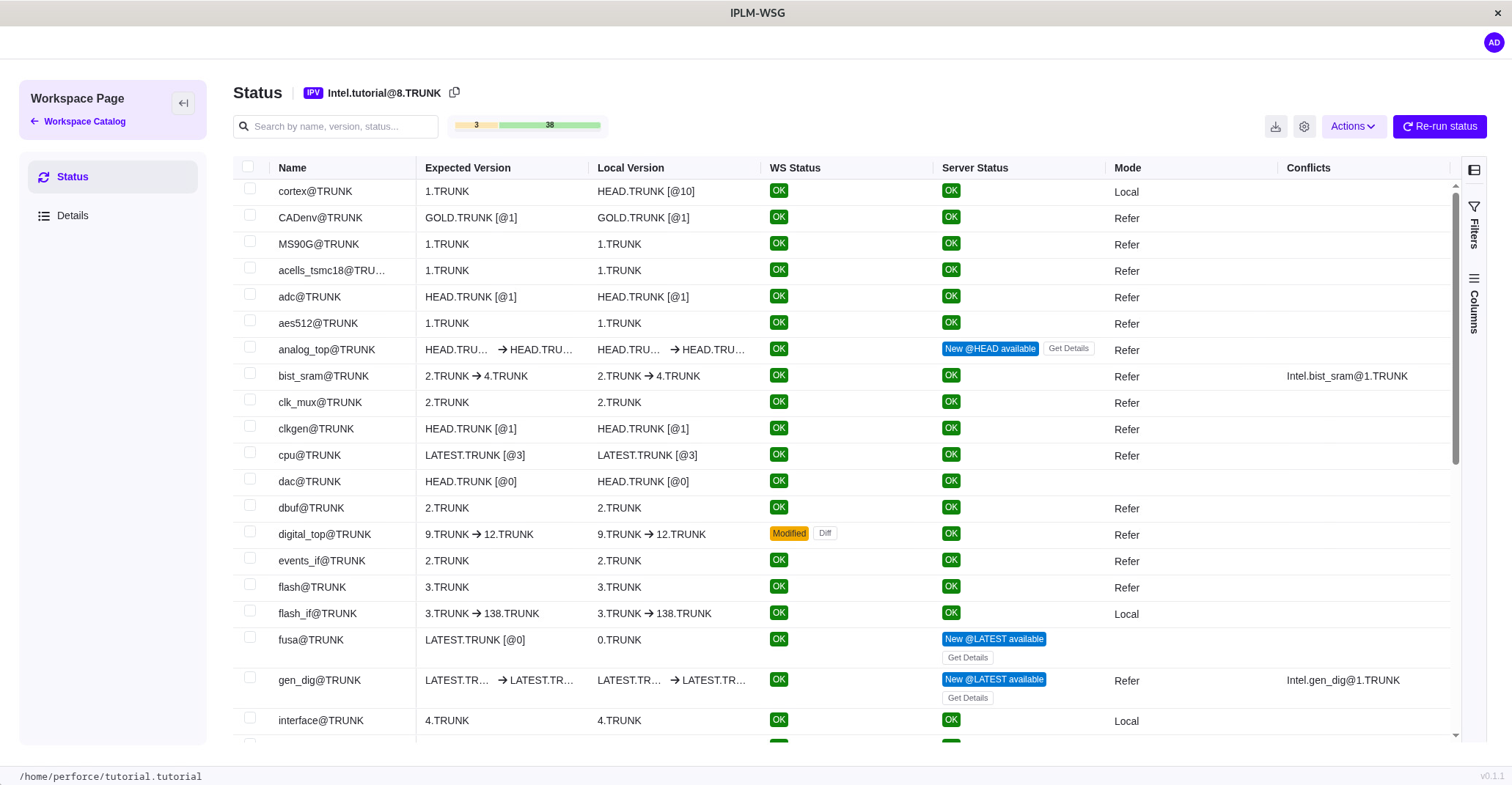
New IPLM Workspace Graphical User Interface (GUI)
We heard your requests for a more intuitive end user experience.
The new IPLM Workspace GUI provides a modern graphical interface for browsing, viewing, and managing IPLM workspaces without requiring command-line expertise. The result is faster onboarding, improved productivity, and a more accessible way for engineering teams to manage design environments at scale.
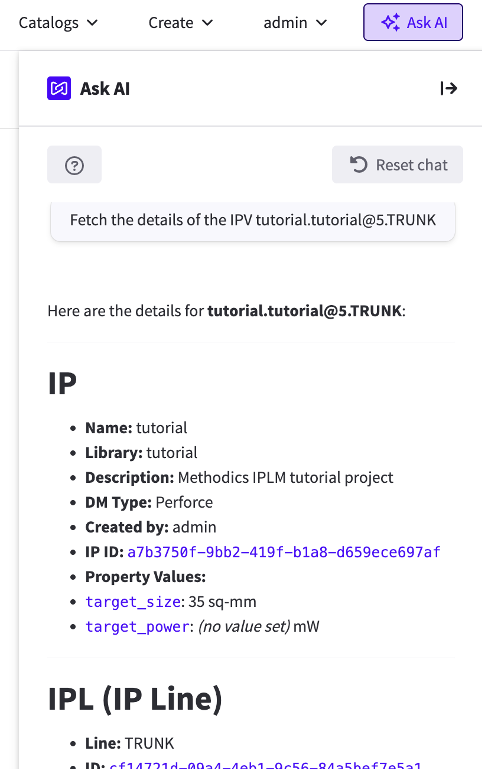
Unleash AI-Powered IP Management
The new IPLM MCP (Model Context Protocol) server makes managing your IPs felt less like navigating a database and more like having a conversation. Use natural language to manage IPs, interact with IPLM through AI tools, and access real-time design context from a single source of truth.
With IPLM MCP, your team can:
- Ask questions in plain language to get up to speed on IPLM faster
- Instantly retrieve IP versions and metadata from across your design ecosystem
- Execute AI workflows—and record results for full traceability and reproducibility
- Eliminate complex queries and tool switching
And so much more. Working alongside IPLM MCP is IPLM RAG (Retrieval-Augmented Generation), which grounds responses in IPLM documentation to ensure accuracy.
Contact us to schedule a demo.
See What’s New in IPLM Core
Check out the latest features in Perforce IPLM Core. Looking to upgrade? Contact your Account Executive or reach out to us.
What's New in IPLM Core
IPLM Core 2026.3
Protected Property Support
Protected Properties are now supported in IPLM Core, allowing users to view and manage property set permissions.
“Dry-Run” Release
Users can now preview the results of a release command before executing the release. This allows you to better understand the impacts of the release and ensure the results are as expected, prior to creating a new IP Version.
Admin User Login
IPLM Admins are now able to log in as another user for easier support and issue resolution.
For a list of all new features, enhancements, and bug fixes, review the release notes.
What's New in IPLM Core
IPLM Core 2026.2
Client Pre-Load Hook
This feature enforces admin-established workflows by governing workspace creation. Admins can enforce a consistent methodology based on criteria such as where IPs may be loaded, IP quality and maturity, and available disk space.
Custom CLI Command Configuration
This feature allows you to configure custom scripts so that they appear and behave like native CLI commands, for a more user-friendly experience.
For a list of all new features, enhancements, and bug fixes, review the release notes.
What's New in IPLM Core
IPLM Core 2026.1
Neo4j 5 Support
With this release, IPLM now supports the Neo4j 5 Cypher query language, providing a more powerful and efficient way to query the Neo4j graph database. Upgrading to Neo4j 5 delivers substantial performance improvements, including:
- Faster UI response times and API call execution
- Reduced wait times for large data sets
- Improved performance at scale
- Next-generation causal clustering for improved data consistency, transactional safety, and scalability for large, distributed systems; replacing HA (High Availability) clustering
This change requires migrating the database before upgrading IPLM Server. Contact your Account Executive to schedule your migration today.
For a list of all new features, enhancements, and bug fixes, review the release notes.
What's New in IPLM Core
IPLM Core 2025.4
Reduced PyInstaller Client Binary Size
The size of client binaries have been reduced by removing unnecessary dependencies. This helps prevent large executable files and repeated extraction into /tmp/_MEI*.
For a list of all new features, enhancements, and bug fixes, review the release notes.
What's New in IPLM Core
IPLM Core 2025.3
Server Side Conflict Resolution
Conflicts arise when there are multiple versions of an IP included within an IPV Hierarchy. Previously, conflicts could only be resolved in the CLI client. This release adds a conflict resolution capability to IPLM Core, and lays the groundwork for the ability to preview the resolved hierarchy in IPLM Web without building the workspace.
For a list of all new features, enhancements, and bug fixes, review the release notes.
What's New in IPLM Core
IPLM Core 2025.2
Event Notifications: Former Value
The IPLM Core event notification system now provides both the former value and new value for notifications that include changed values, so users can see what has changed and take action as needed.
Python 3 Upgrade
With this release, IPLM CLI now supports Python 3.12.
For a list of all new features, enhancements, and bug fixes, review the release notes.
See What's New in IPLM Web
Check out the latest features in Perforce IPLM Web. Looking to upgrade? Contact your Account Executive or reach out to us.
What's New in IPLM Web
IPLM Web 2026.6
Shopping Cart Improvements
IPLM Web 2026.6 includes a set of Shopping cart improvements that help prevent over-capacity adds and make cart management more efficient. As the cart approaches its configured limit, a warning message appears. Once the limit is reached, add actions across the product are disabled until you remove one or more items from the cart. Users can also remove multiple IPVs in a single bulk action from the Shopping cart grid.
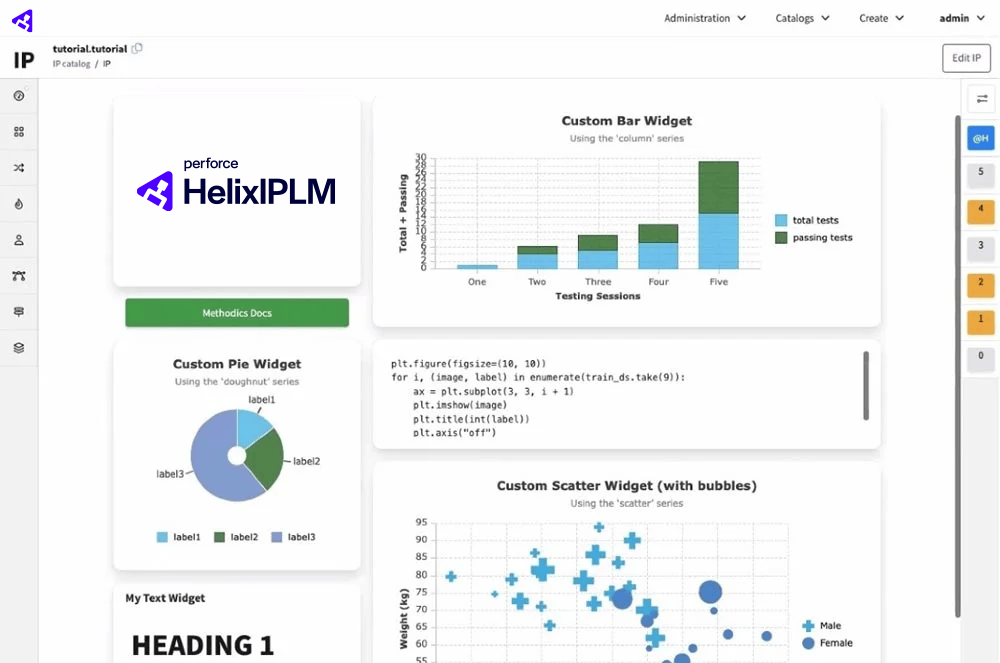
AI Instant Dashboards and Widgets
Generate complete dashboards or individual widgets from natural-language prompts. Generated configurations are validated and repaired automatically when possible. You can refine a dashboard with follow-up prompts, edit its layout, lock or unlock it, save it as a PDF, or regenerate individual widgets without regenerating the entire dashboard. You can also refresh, reset, and cancel widget requests. Instant dashboards and widgets persist during page reloads and in-app navigation in the same browser tab, but are not saved to the IPLM Server.
Home History Widget
The Home page now includes a history widget that lets you filter recent visits by IP version, library, or query. The widget updates the displayed list in place and groups items by date.
Improved Favorites Management
Favorites now use dedicated collection objects instead of the legacy custom object model. Administrators can migrate existing favorites, and new configurations no longer require the IPLM Web configurator be run. Favorites are organized by IP version, library, and query, with a maximum of 100 items per type.
For a full list of features, enhancements and bug fixes, see the release notes.
IPLM Web 2026.5 introduces improvements to Library administration and grid filtering. Admins and Library owners can now configure Library permissions directly in IPLM Web, eliminating the need to use PiCLI or the API for this task. This release also extends the advanced grid filtering capability to additional grids across the application.
Additional Details:
- IPLM Web 2026.5 requires IPLM Server 2025.4 or later.
- Set, edit, and remove Users and Groups permissions on Libraries directly from Administration > Libraries in IPLM Web.
- The advanced grid filtering capability introduced in 2026.3 for the IP catalog is now available in additional grids including shopping cart, IP > Version list, and IP > Details > Properties.
- Apply visual annotations to grid cells using filter-based rules that style matching cells with background colors, borders, text colors, bold, italic, or underline formatting.
See full release notes here.
What's New in IPLM Web
IPLM Web 2026.4
AI Assistant
This release introduces a built-in AI Assistant that connects to the IPLM MCP server to enable users to ask questions in natural language, generate page summaries, and interact with IPLM data in real time within the IPLM Web interface, along with integrated contextual Help to browse IPLM documentation.
Other Key Enhancements
- Redesigned Shopping Cart for easier access without admin setup.
- Expanded visualization options such as custom icons and flexible display of IPVs in the Version list.
- Ability to export version data to CSV.
For a list of all new features, enhancements, and bug fixes, review the release notes.
Please note that these enhancements and all future IPLM Web and IPLM Cache updates will only be available to organizations that have upgraded to the IPLM Core 2024.3 release or higher. Contact your Account Executive to schedule your migration.
What's New in IPLM Web
IPLM Web 2026.3
Table UI Enhancements
This release improves the filtering capabilities of the IP Catalog. Enhancements include a new Filter Row, which allows users to easily filter within columns by a specific value, and a new Filters and Columns sidebar:
- In the Filters tab of the sidebar, users can easily filter by multiple values at once.
- In the Columns tab of the sidebar, users can quickly add, remove, or re-order columns in the table.
For a list of all new features, enhancements, and bug fixes, review the release notes.
Please note that these enhancements and all future IPLM Web and IPLM Cache updates will only be available to organizations that have upgraded to the IPLM Core 2024.3 release or higher. Contact your Account Executive to schedule your migration.
What's New in IPLM Web
IPLM Web 2026.2
Create & Edit Property Sets
This release streamlines the process of creating and editing Property Sets for a more efficient user experience.
Admins can now set protected property permissions (such as read, write, or owner) in the new Property Set Permissions tab, rather than setting these permissions via API. Filters and bulk permission editing make configuring permissions faster and easier.
For a list of all new features, enhancements, and bug fixes, review the release notes.
Please note that these enhancements and all future IPLM Web and IPLM Cache updates will only be available to organizations that have upgraded to the IPLM Core 2024.3 release or higher. Contact your Account Executive to schedule your migration.
What's New in IPLM Web
IPLM Web 2026.1
Rebrand to Perforce IPLM
Perforce Helix IPLM is now simply "Perforce IPLM." This includes a new logo and a new look and feel that reflects IPLM's place within broader DevOps workflows. To learn more, see our blog: Helix IPLM is now Perforce IPLM.
SSO Enhancement
With this release, IPLM now has a common SSO authentication service definition for both IPLM Core and IPLM Web. This common definition simplifies the coordination of SSO configuration between IPLM Core and Web, making SSO management more convenient and efficient for IPLM Admins.
For a list of all new features, enhancements, and bug fixes, review the release notes.
Please note that these enhancements and all future IPLM Web and IPLM Cache updates will only be available to organizations that have upgraded to the IPLM Core 2024.3 release or higher. Contact your Account Executive to schedule your migration.
What's New in IPLM Web
IPLM Web 2025.8
With this release IPLM Web now supports Vue.js 3.
For a list of all new features, enhancements, and bug fixes, review the release notes.
Please note that these enhancements and all future IPLM Web and IPLM Cache updates will only be available to organizations that have upgraded to the IPLM Core 2024.3 release or higher. Contact your Account Executive to schedule your migration.
What's New in IPLM Web
IPLM Web 2025.7
Hierarchy tab enhancements
The IP page's Hierarchy tab now offers the following improvements to the user experience:
- Users can now scroll through all hierarchy data on one continuous page, removing the need to click through the hierarchy one page at a time. This allows users to maintain focus on the IPs they are currently interested in.
- The “Levels” drop-down now clearly indicates (in blue) when one of its filters has been applied to the set of IPs. User interaction with the hierarchy tree (or list) will remove the currently applied filter.
- The “Expand tree” and “Collapse tree” action buttons have been removed, since the same functionality is available from the “Levels” drop-down and the IP tree, respectively.
Conflict-resolved view of IPV hierarchy
Conflicts occur when multiple versions of the same IP appear in the same IPV hierarchy. The IP page’s Hierarchy tab now offers a view of the IPV hierarchy that has conflicts resolved. This new “Conflict-resolved tree” view has the following benefits:
- Offers a preview of what users will see in their workspace when they build it from the standard IPV tree, i.e., the default “Standard release tree” view on the Hierarchy tab.
- Allows users to see how their conflicts will be resolved when the workspace is built, since IPLM Server uses the same algorithm to generate the workspace.
Specify IPLM Help system login in Web configuration
Administrators can now specify the organization’s user id and password for the IPLM Help system in their Web configuration file, removing the need for users to enter login credentials when viewing Help topics.
For a list of all new features, enhancements, and bug fixes, review the release notes.
Please note that these enhancements and all future IPLM Web and IPLM Cache updates will only be available to organizations that have upgraded to the IPLM Core 2024.3 release or higher. Contact your Account Executive to schedule your migration.
See What's New in VersIC
Check out the latest features in Perforce VersIC. Looking to upgrade? Contact your Account Executive or reach out to us.
What's New in VersIC
VersIC ADS 2026.2
Perforce Streams and Mixed Workspace Support
This release introduces full verification and QA sign-off for VersIC interoperability with Perforce Streams workspace clients, as well as robust support for mixed workspaces containing both P4 Streams and Classic P4 depot clients, including multi-P4D server environments.
All user stories under Epic VERSIC-1037 have been verified across Cadence Virtuoso Library Manager, VersIC data forms, and MergeIC integration.
Rollback Options and Checkout Behavior
When initiating a rollback from either the Manage VersIC Data form or the CellView History form, you are now presented with an updated confirmation dialog that lets you choose how to handle the checkout state.
Rollback (With Commit): Restores the cellview to the selected historical version and immediately commits the change into the DM system.
Rollback Without Commit / Remain Checked Out: Overwrites the workspace copy with the contents of the selected historical revision while retaining the active checkout state. This allows you to inspect, modify, or test the older revision locally before deciding whether to check in your changes.
When executing a rollback action on a selected library, cell, or view revision, the new confirmation dialog appears and prompts you to choose whether to commit immediately or keep the cellview checked out. The same behavior is available from the CellView History form.
Improved Multi-Library Hierarchy Support
Cellview Hierarchy now includes library origins for nested cell instances outside the top level, and Hierarchy Actions now correctly process cell hierarchy instances that reside in external libraries across multi-library CDS cell hierarchies, including mixed P4 Streams and P4 classic environments.
Improved Import+ and Checkout Visibility
VersIC / Virtuoso Manage Checkouts now includes CellViews opened from libraries referenced using import+, even when they are already checked out in Perforce and shown as checked out in the Library Manager.
More Reliable Status and Workspace Checks
Fixed false "modified" status reports and client viewmap warnings in multi-client workspaces. The release resolves an environment context race condition where asynchronous background checks could corrupt active client settings during status queries.
For additional details on updates and bug fixes, see full release notes.
What's New in VersIC
VersIC CDS 2026.1
With this release, VersIC CDS now supports multiple P4 servers, providing improved visibility for large, complex organizations with enterprise P4 environments. Organizations with multiple P4 servers can now see all data, history, etc. across all P4 servers in one place.
This update also allows companies of any size to easily view P4 log information, such as checkins and versions, in refer mode across multiple P4 clients.
What's New in VersIC
VersIC ADS 2025.2
This release further expands on the Keysight ADS integration. Users can now Sync and Retrieve file versions from the History.
Syncing allows you to look back to view the historical version of your file.
Retrieve brings back the historical version for further inspection and comparison.
What's New in VersIC
VersIC ADS 2025.1
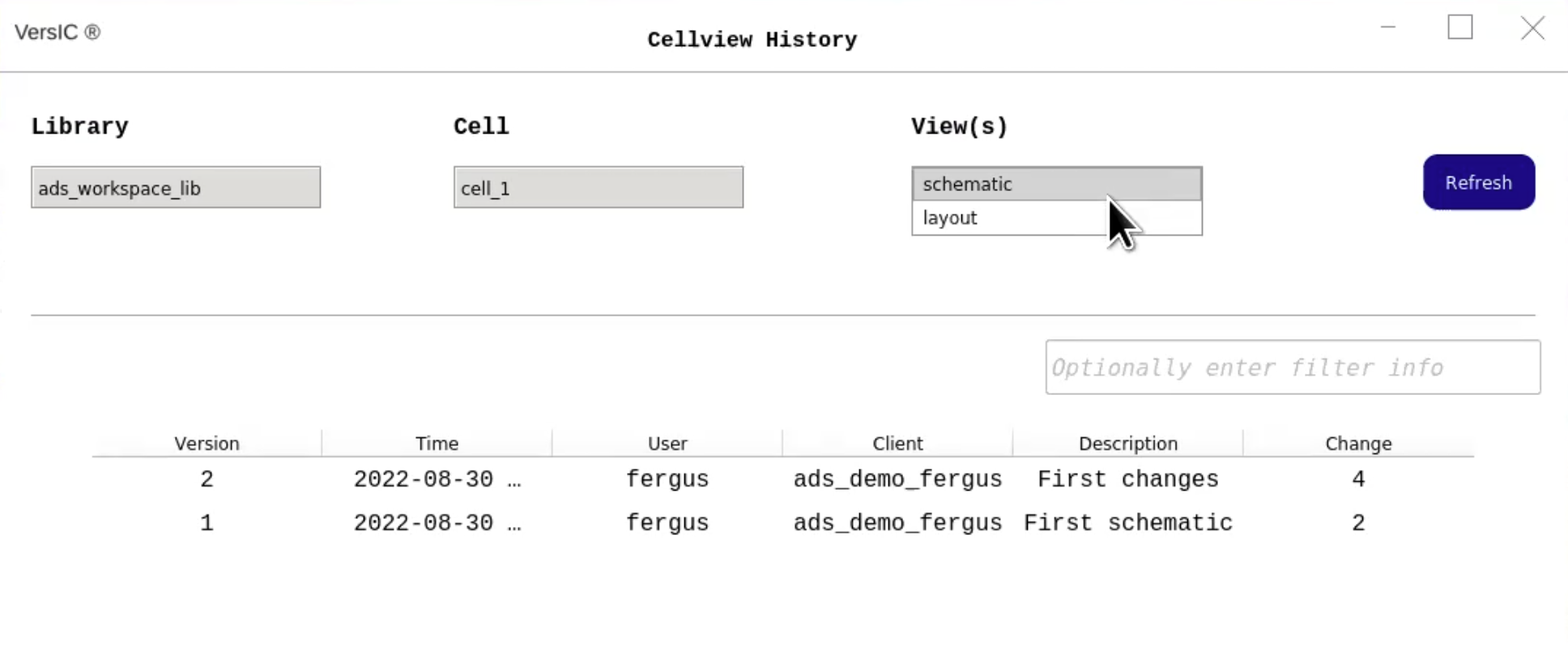
This release expands on the initial Keysight ADS integration introduced in December, 2024. Users can now view IP Version history details in the Cellview History.
This release also introduces an updated, modern user interface for VersIC ADS.
What's New in VersIC
VersIC ADS 2024.1
This release provides the initial integration between VersIC and Keysight Advanced Design System (ADS), which allows users to use VersIC within ADS. This integration delivers the unlimited scalability, rapid file access, and enterprise security of P4 (formerly Helix Core) data management to ADS users without requiring designers to learn a new data management system or methodology.
Upgrade to the Latest Version
Talk to an expert to get the latest version of Perforce IPLM or VersIC.