
Blog
July 2, 2026
AI-Assisted Code Remediation: How to Connect Any MCP Host to Perforce Static Analysis

AI
Static analysis has always excelled at finding defects, vulnerabilities, and compliance violations. Before AI-assisted code remediation, however, developers still had to research the root cause, design a fix, and manually verify that the correction satisfies the relevant requirements.
The new, built-in AI-assisted code remediation feature speeds up this process. Instead of just flagging a problem, the integrated AI assistant in Perforce Static Analysis analyzes the defect using deep contextual data and suggests a precise, compliant fix that the developer reviews and approves, allowing the AI to then apply an auto-fix.
At the center of this feature is the Perforce Static Analysis MCP Server, which lets any MCP-compatible host connect to your Perforce tools and apply remediation using its own configured Large Language Model (LLM). The result is a flexible workflow that meets developers wherever they already work, rather than forcing them into a single proprietary interface.
In this blog, we explain how the MCP Server works, walk through the main types of MCP hosts, and look at specific AI tools you can connect today.
Back to top
How the Perforce Static Analysis MCP Server Works
A Model Context Protocol (MCP) is an open standard interface that allows AI systems to access and use external tools and data. The Perforce Static Analysis MCP Server is the piece that sits in front of your Perforce Static Analysis tools, making them accessible to any MCP-compatible client.
In the current practical setup, each developer runs an MCP server in their own environment. Their IDE — VS Code, for example — supports MCP natively. The developer opens the IDE configuration, adds an MCP server entry, and points that configuration at the Perforce Static Analysis MCP Server. From that moment, the LLM running through the IDE can communicate directly with the Perforce Static Analysis toolset.
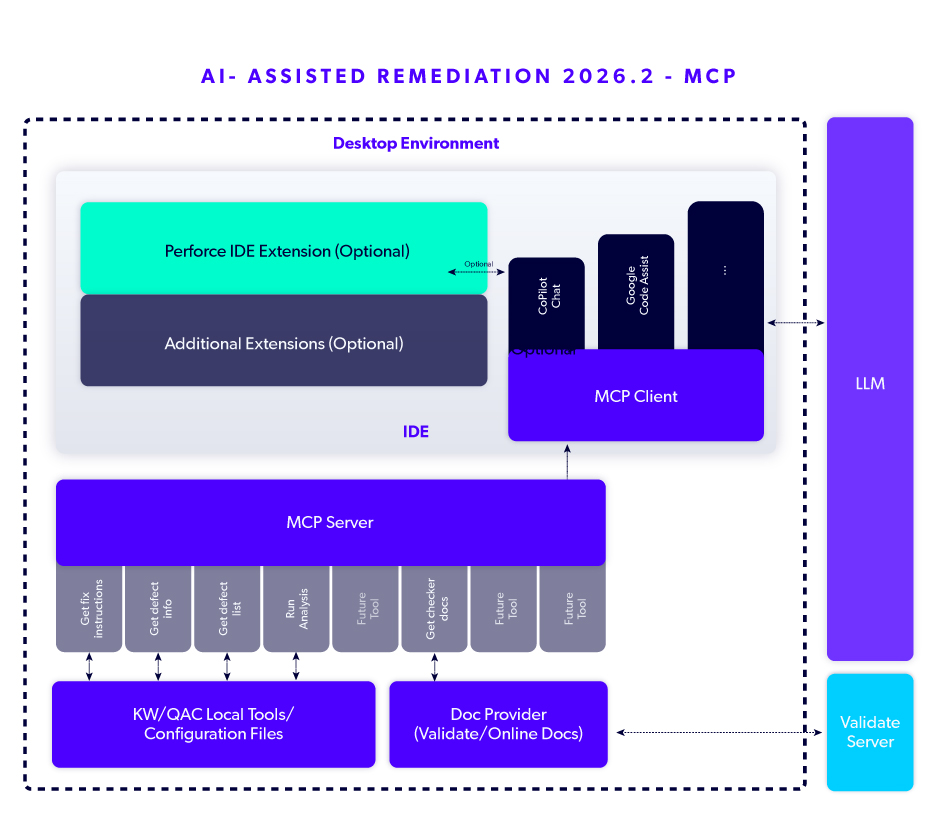
The flow looks like this:
- You write and analyze code in your IDE, running incremental analysis on demand to surface defects, coding standards rule violations, and security vulnerabilities early.
- From the static analysis results, you identify a candidate defect for remediation and request the LLM to assist.
- The LLM requests all information available about the selected defect, including deep contextual data via the MCP.
- The LLM proposes a fix based on the data, which displays in the AI chat interface — and, if there is an appropriate plugin installed, can provide the fix suggestion directly in a diff window in your IDE.
- Automatic re-analysis occurs as soon as the fix is proposed. Then, based on the results of the re-analysis, you review and approve the suggestion (if acceptable). Quality and compliance stay intact thanks to a human-in-the-loop review.
The key detail is what the MCP Server does not dictate: the AI model. You bring the LLM that your host is configured to use. That single design decision is what makes this approach so flexible.
Back to topWhy Flexibility Matters in AI-Assisted Code Remediation
Even within the same organization, development teams are not uniform. One engineer may live in VS Code while another runs everything from the terminal, for example. A remediation tool that only works inside one tool's chat window forces those teams to change their habits (or skip the feature entirely).
By using AI-assisted code remediation with the MCP Server, you avoid these issues. The benefits are many:
- Use the tools you already trust. Because the MCP Server speaks a standard protocol, it plugs into any MCP-compatible host. There is no need to abandon your preferred IDE or editor.
- Choose your own LLM. Teams with strict security or budget requirements can point the workflow at a local model, while teams that prioritize raw capability can use a leading cloud model. The choice is yours.
- Avoid vendor lock-in. As the AI landscape rapidly shifts, you can swap models or hosts without re-architecting your analysis workflow.
- Keep compliance at the center. No matter which host or model you connect, every fix is checked against your configured coding standards, from MISRA and CERT to your own internal rules.
This flexibility is a huge advantage, allowing AI-assisted code remediation to fit real engineering teams instead of asking them to reshape themselves around a single tool.
Back to top3 Types of MCP-Compatible Hosts You Can Connect
Any MCP-compatible host can load the Perforce Static Analysis MCP Server, enabling its AI model to access Perforce Static Analysis tools. In practice, those hosts fall into three main categories.
1. AI Chat/Assistant Interfaces
AI chat interfaces, such as Claude.ai and Claude Desktop, connect to the MCP Server and gain access to the contextual data and documentation needed to generate accurate fix suggestions. This interaction model suits developers who want to query findings in natural language. A developer can ask the assistant to explain a specific MISRA violation, request a corrected code snippet, and review the suggested change before applying it, all within a single conversational session.
2. AI-Enabled IDEs and Code Editors
AI-enabled development environments, including Claude Code and Visual Studio Code with GitHub Copilot, represent the most direct integration point for remediation work. These hosts connect to the MCP Server and surface fix suggestions inline, so the developer working in these environments can receive a violation finding, a plain-language explanation, and a validated fix suggestion without switching context. The Perforce Static Analysis MCP Server delivers the data; the IDE's AI model applies it.
3. Agentic and Automation Frameworks
Agentic frameworks such as LangChain, AutoGen, and custom agent runtimes represent the most automated end of the host spectrum. Rather than waiting for a developer to initiate a query, these hosts orchestrate multi-step workflows autonomously, connecting to multiple MCP servers to gather context and act on it.
For teams taking a static analysis approach, this helps to automate remediation pipelines. An agent can retrieve findings from the Perforce Static Analysis MCP Server, generate candidate fixes using a configured LLM, run validation checks, and prepare a pull request for human review — all without manual intervention at each step.
Back to topSpecific AI Tools You Can Use Today
The choices are many when it comes to MCP compatibility with Perforce Static Analysis. Here are a few examples of popular tools you can use today.
Claude Code
Claude Code is one of the most popular and capable options available, and it supports plugins that run on the backend. It is a terminal-first environment, which introduces some subtle differences from a graphical IDE. Because the terminal does not automatically display elements like a diff analysis window, you may need to prompt Claude Code explicitly to surface the same information an IDE would show by default. For developers who want the polish of a graphical view, there is a Claude Code plugin for VS Code that brings the experience inside the IDE.
Cursor
Cursor is an AI-first code editor built around model-assisted development. As an MCP-compatible host, it can connect to the Perforce Static Analysis MCP Server and apply remediations using its configured model, making it a strong choice for teams that have already adopted an AI-centric editor.
Ollama and Local LLMs
Ollama lets you run a model on a dedicated machine in your local network. You download a copy of a model and run it locally, which means you are not paying per-token fees for an offsite service. This is the route to a fully local LLM, and it is not the only one: Several platforms support local execution, and there are hundreds of models to choose from, including options like Qwen from Alibaba. For privacy-sensitive teams that cannot send source code to external services, this is a viable choice. Any MCP-compatible host — whether it uses a cloud-based LLM or a locally running model via Ollama — can connect to the Perforce Static Analysis MCP Server.
Back to topBring AI-Assisted Code Remediation into Your Workflow
The strength of Perforce Static Analysis AI-assisted code remediation is that it's not tied to any single editor or model. Connect it to the IDE, chat client, or AI plugin your team already uses, pair it with the LLM that fits your security and budgetary requirements, and every suggested fix is still held to the same rigorous analysis and compliance standards of Perforce Static Analysis tools — Perforce QAC and Perforce Klocwork.
That flexibility allows you to adopt AI on your own terms: catching issues early, resolving them faster, and keeping a human in the loop the whole way through.
Ready to see it in action? Request a free trial of Perforce Static Analysis and discover how AI-assisted code remediation works in your environment to accelerate your path to safe, secure, and compliant code.