
Blog
January 15, 2026
Architectural Visualization with Unreal Engine: Trends, Challenges, and Workflows

Version Control,
Digital Creation & Collaboration
Architectural visualization, or archviz, has shifted rapidly from static 2D renders to immersive 3D experiences that have transformed how architects, designers, and developers communicate their vision. Using this technology, a development team can “walk” clients through hyper-realistic replicas of an office headquarters or residential complex well before ground is ever broken. Users can provide instantaneous feedback on materials, lighting, and layouts to minimize issues once construction begins.
This evolution is driven by game engines like Unreal Engine 5 (UE5). Originally designed for video game creation, these real-time 3D engines have been adapted across a wide number of industries to construct virtual worlds at 60 frames per second. However, this visual power brings specific challenges regarding file size, collaboration, and version control. High-fidelity textures, complex geometry, and frequent design iterations create challenges that traditional workflows struggle to handle.
To help architectural teams, developers, and visionaries using Unreal Engine but new to Version Control Systems (VCS), we’ve created this introductory guide that explores the latest trends in archviz as they relate to this challenge. We’ll cover how to integrate Building Information Modeling (BIM) data seamlessly and how a robust version control system like Perforce P4 provides the necessary governance and scale for high-performance visualization teams.
Back to topDefining Architecture Visualization in the UE5 Era
Architecture visualization is the process of creating photorealistic, three-dimensional renderings of environments and structures, including buildings, landscapes, and interior spaces. In the UE5 era, this means presenting these elements with real-time interactivity.
Using Unreal Engine 5, creators can build living worlds where lighting, physics, and materials behave realistically. Once built, users can navigate these 3D spaces while changing materials and lighting on the fly. Without the traditional delay needed to render the updated environment, teams can engage in immediate feedback loops. A client can ask to see different floor materials and the designer can swap them instantly within the simulation. Collaboratively, they can make an informed decision on the best option for the physical build.
📃Related Resource: How to Use Unreal Engine 5
Back to top3 Archviz Trends to Watch
As game engine technology matures, three key trends are reshaping how studios approach visualization:
1. Real‑Time Rendering & Interactivity
Waiting hours for a single frame to render is becoming a relic of the past. UE5 features like Lumen and Nanite empower architects to create cinematic-quality visuals that run in real time.
- Lumen: This global illumination system reacts to scene changes immediately. If you move a wall or change the time of day, the light bounces accurately without any recalculation time. This allows for dynamic day-night cycles that show clients exactly how natural light will affect each space.
- Nanite: This virtualized geometry system allows artists to import film-quality source art comprising millions of polygons. You can import raw ZBrush sculpts or photogrammetry scans directly into the engine without manually optimizing or creating "Level of Detail" (LOD) meshes.
- VR/AR Integration: Real-time rendering powers immersive Virtual Reality (VR) and Augmented Reality (AR) experiences. Clients can wear a VR headset to walk through a 1:1 scale model of their future office to gain a true sense of scale accuracy.
2. AI-Driven Archviz Content
Artificial intelligence (AI) streamlines the tedious parts of the creative process. AI tools now assist in auto-generating textures, populating scenes with realistic vegetation, and even optimizing lighting setups. This automation frees artists to focus on high-level creative decisions rather than manual asset placement. For studios, this means faster turnaround times and the ability to produce multiple design variations for clients without additional budget.
3. Sustainability & Story‑Driven Visuals
Modern visualization does more than show a building; it tells a story about sustainability and lifestyle. By connecting the Unreal model to IoT sensor data, facility managers can visualize user flows, energy consumption, and occupancy rates in real-time. By simulating weather patterns and environmental interactions, architects can demonstrate how a building performs in its ecosystem. This narrative approach helps clients understand the long-term value of their design choices.
Back to topBeyond Aesthetics: Data and BIM Management
Unreal archviz presentations require a seamless connection between the visual model and the engineering data behind it. When properly integrated, the visual model allows stakeholders to make key decisions on the design, materials, and cost of an architectural project.
Bridge Archviz, BIM, and Data Workflows
Moving data from Computer-Aided Design (CAD) and Building Information Modeling (BIM) software (like Revit, Rhino, or Archicad) into Unreal Engine turns a visual asset into a functional tool.
By integrating Unreal projects with BIM platforms, teams maintain a live link between the design and the visualization. If an archtect moves a window in Revit, that change can propagate to the Unreal model. This ensures the current design iteration always reflects the architects’ latest vision.
Most importantly, this connection preserves crucial metadata such as material costs, manufacturer details, and thermal properties within the interactive model. For example: a user clicking on a wall in the visualization can see exactly what it is made of and how much it costs.
Back to top5 Challenges Facing Visualization Architects
Despite the power of UE5, adopting a cohesive real-time workflow introduces significant hurdles for architecture firms:
1. Pipeline Complexity
Moving data from CAD or BIM software into a game engine remains a friction point. While tools like Datasmith simplify the import process, teams often struggle with tessellation quality, hierarchy management, and naming conventions.
Without a clear, coordinated pipeline, a project can quickly become disorganized and break as designs change. Additionally, maintaining the correct Level of Detail (LOD) for city-scale models without crashing the system can be a constant balancing act.
2. Hardware and Cost Constraints
Real-time rendering requires powerful hardware. Architectural teams need high-end GPUs and workstations to run complex UE5 scenes smoothly. For studios attempting to scale, the cost of equipping designers with game-ready workstations and the cloud infrastructure needed to stream video for clients can be a barrier.
3. Revision Cycles
In architecture, the design is never truly finished until construction ends and the ribbon is cut. Clients will make frequent change requests, even late in the process.
This is where an inefficient or brittle visualization pipeline becomes a bottleneck. Even a simple request to move a wall can trigger days of rework. Robust digital content creation (DCC) pipelines are essential to survive the revision cycle.
4. Skill Gaps
There is a fundamental difference between creating a static render and building a real-time application. Artists coming from traditional rendering backgrounds must learn game engine concepts like optimization, blueprints (visual scripting), and interaction design.
5. Collaborating at Scale
As archviz projects grow in complexity, collaboration becomes more difficult to manage. Large teams working on the same visualization can lead to version conflicts, lost work, or disorganized pipelines.
Coordinating across multiple artists, developers, and stakeholders requires robust systems for asset management and version control. Without these, scaling up collaboration can cause delays and inefficiencies that erode the benefits of real-time workflows.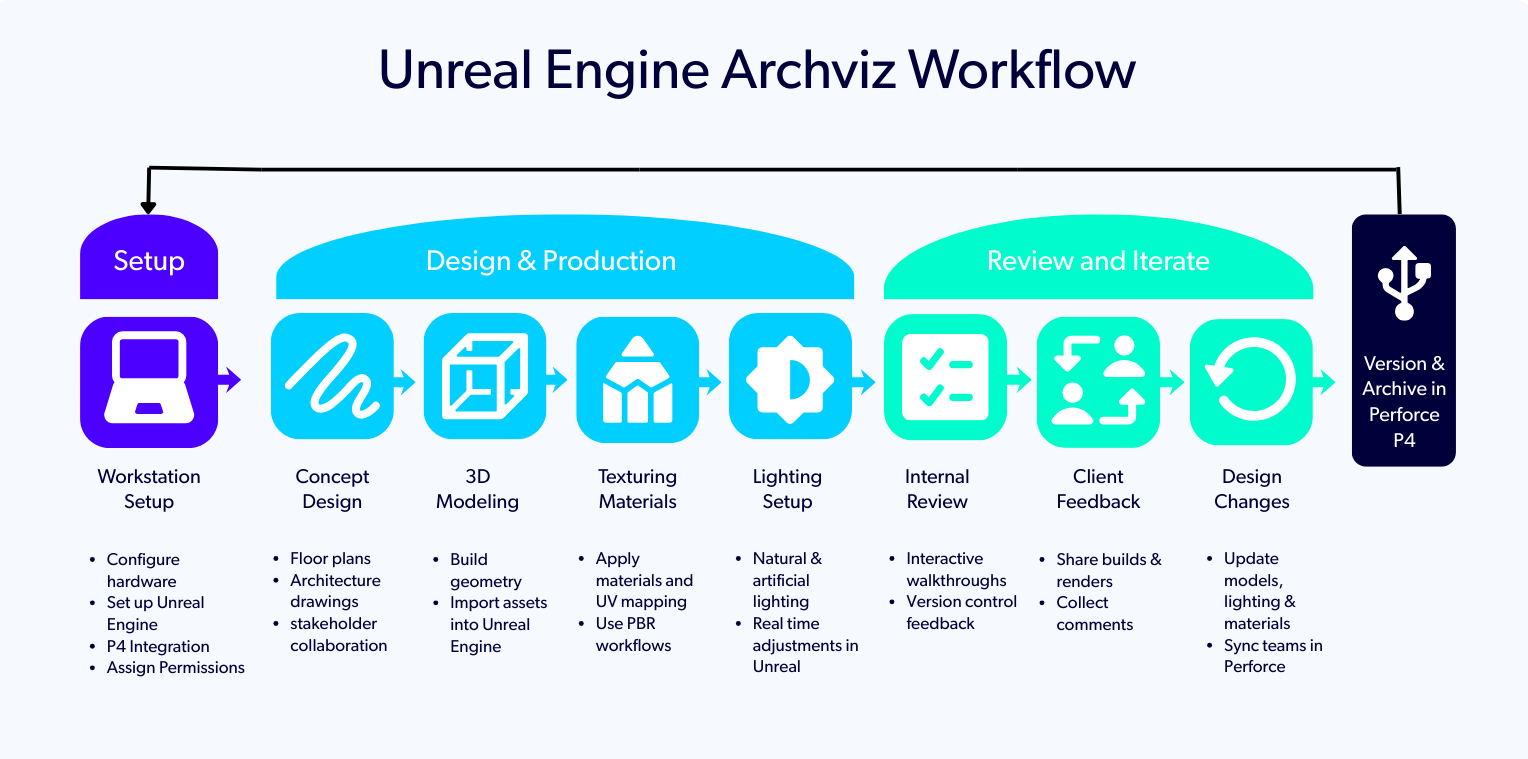
Solving Unreal Engine Architecture Visualization Issues with Perforce
To solve these challenges, treat your archviz projects like software development projects using Perforce P4 version control. Here is how a Perforce-driven pipeline supports excellence in UE5:
Setting Up Source Control in UE5
P4 integrates natively with Unreal Engine 5. Once configured, it allows multiple artists and developers to work on the same project simultaneously without overwriting each other's work. Features include:
- Asset Locking: UE5 allows users to "check out" a file when they start editing it. This locks the binary asset and prevents other team members from making conflicting changes.
- Unreal GameSync (UGS): This tool allows artists to sync to specific pre-compiled binaries of the engine and project, eliminating the need to compile code themselves. This ensures that everyone sees exactly the same version of the project and eliminates "it works on my machine" conversations and associated errors.
Artist-to-developer Workflow
P4 handles the different needs of creative artists and technical developers. Artists can use simple graphical clients or the in-engine integration to version their assets. Developers can use command-line tools and Perforce Streams to handle code branching and merging. This unified workflow prevents silos and keeps the art and code in sync.
Git Vs Perforce for Archviz
Many studios use Git because they are familiar with it. Unfortunately, Git struggles with large binary files such as textures, 3D models, and audio that are needed for archviz projects. Under this weight, Git repositories slow down and become unwieldy.
P4 is designed to handle petabytes of data and millions of massive binary files. It allows teams to fetch only the files they need so that workspaces remain manageable. For an archviz project using hundreds of gigabytes, P4’s scalability could mean the difference between a successful build and frustrating delays.
| Feature | Git | Perforce |
|---|---|---|
| Designed For: | Text-based code | Large binary files (e.g., .uasset, .fbx, .psd), ideal for archviz projects |
| Performance | Struggles with large binary files. Repositories slow down as projects grow. | Easily handles massive datasets for smooth performance. |
| Scalability | Becomes unwieldy and difficult to manage with large projects. | Scales effortlessly for complex, city-scale projects. |
| File Management | Potential conflicts due to limited file locking capabilities. | Supports file locking to prevent overwrites. Team collaboration runs smoothly. |
| Best Use Case | Software development with small or text-based files. | Large-scale projects requiring high performance and collaboration for visualization and binary data management. |
📃Additional Resource: Git Vs P4: How to Choose (and When to Use Both)
Back to topSecurity and Governance for Architectural Visualization
Implementing a strong data management strategy protects your intellectual property, especially when working on sensitive projects such as data centers, government facilities, or high-end luxury buildings.
P4 comes standard with robust security features that protect your data at all levels of vulnerability:
Granular Permissions
Unlike ad-hoc file sharing, P4 offers granular access control. You can define exactly which users or groups can see specific folders or files. You can grant a contractor access to a single building model without exposing the entire city master plan.
One Source of Truth
P4 acts as a single source of truth that eliminates any need to scatter files across network drives, Dropbox links, and personal hard drives. The BIM exports, the Unreal project, the custom scripts, and the documentation all live in one secure repository.
Auditability
Every change in the project is recorded. You know exactly who modified the BIM data, who updated the lighting, and when it happened. This audit trail is crucial for traceability, governance, and resolving disputes about design changes.
IP Protection
Centralizing your assets in a secure, on-premises, or cloud-hosted P4 server protects your Intellectual Property (IP). You control all data, including proprietary designs and AI-generated assets, within your secure environment.
Watch the Setup Demo
Want to see Unreal Engine features and workflows through the eyes of an expert? Our Upgrade to UE5: How to Manage Your Game Engine webinar gives a detailed look at Unreal Engine 5, plus guides you on how to build a UE5 Perforce pipeline. Learn why game engines and version control work better in tandem.
Back to top
Optimize Your Unreal Engine Archviz Experience
In this overview, we’ve outlined the biggest trends in archviz. We’ve explored the challenges teams face in creating rich, immersive experiences for their clients, and how an Unreal Engine architectural visualization workflow that incorporates dedicated version control mitigates these issues.
Harness Perforce P4 to create a secure, collaborative environment where creative teams aren’t burdened by data management issues and developers can easily manage large asset libraries, complex projects, and globally located stakeholders, all from one central cockpit.
Ready to build a better archviz pipeline and start managing your Unreal Engine projects with professional-grade version control? Talk to a Perforce expert or try P4 for free today.